How to Use AI as a Worldbuilding Partner for Your Fantasy Novel
Turn AI into a reliable worldbuilding partner for your fantasy novel with a world bible system, prompt templates, and tools that keep your lore consistent.
AIWorldbuildingFantasy Novel

AI hallucinations happen when models generate confident but false answers. Here's why it occurs and how to spot and reduce it.

Key Takeaways
- AI hallucinations happen when a model generates false information that sounds convincing.
- The core cause is that models predict likely words, not verified facts.
- Training data quality, model complexity, and vague prompts all play a role.
- You can reduce hallucinations with better prompts, retrieval-based grounding, lower randomness settings, and human review.
- No use case is risk-free, but high-stakes fields (legal, medical, academic) need the most caution.
You ask a chatbot a simple question. It answers fast, sounds sure of itself, and even quotes a source. You move on with your day.
Then, a week later, you find out the source doesn't exist. The quote was invented. The "fact" was fiction dressed up in a confident tone.
This isn't a glitch you'll only run into once in a while. It's one of the most common problems in AI today, and it has a name: hallucination. If you use AI tools for work, school, or research, understanding why this happens (and how to catch it) can save you from real embarrassment, or worse.
An AI hallucination is when a model produces an answer that sounds correct but isn't. It's not lying on purpose. It doesn't "know" it's wrong. It's simply predicting words that fit a pattern, and sometimes that pattern leads to a made-up answer.
The term comes from IBM's description of a large language model perceiving patterns or objects that don't actually exist, resulting in outputs that are nonsensical or inaccurate. The word "hallucination" is a metaphor, not a literal description. The AI isn't seeing things the way a person might. It's generating text based on probability, and probability sometimes points in the wrong direction.
Here's the tricky part: hallucinated answers often sound just as confident as correct ones. There's no built-in "I'm not sure" flag. That's what makes this problem hard to catch, especially for beginners who trust the output at face value.
Seeing real cases makes this easier to understand than any definition.
These aren't edge cases from years ago. Hallucinations still happen with today's most advanced models, just less often than before.
There's no single cause. It's usually a mix of a few things working together.
A language model doesn't store facts the way a database does. It predicts the next most likely word based on patterns learned from massive amounts of text. Most of the time, this produces accurate results. But when the model faces a gap in its knowledge, it fills that gap with something that "sounds right" instead of admitting uncertainty.
If the training data itself contains errors or bias, the model can pick up on patterns that aren't actually true, leading to incorrect outputs. Garbage in, garbage out still applies, even with billions of parameters involved. Additionally, training models recursively on AI-generated content can lead to severe data degradation, a phenomenon known as model collapse.
Very large models can memorize unusual patterns from training data and combine pieces of knowledge in complex ways. Sometimes that complexity backfires. A bigger, more capable model can actually produce a more convincing hallucination than a simple one, because it phrases the wrong answer just as smoothly as the right one. This is one reason developers are turning to the small model renaissance for more predictable, specialized behaviors.
When a request is unclear or asks for something the model genuinely doesn't know, it may just make something up rather than say "I don't know." This is closer to a design flaw than a bug. Most models are built to always produce an answer, not to pause and flag uncertainty. Structuring prompts using prompt engineering best practices can help set clear boundaries and guide the model's behavior.
An AI model isn't cross-referencing every claim against a live database unless it's specifically connected to search or retrieval tools. Without that grounding, it's working purely from patterns learned during training.
Not all hallucinations look the same. Here's a simple breakdown:
| Type | What It Looks Like | Example |
|---|---|---|
| Factual hallucination | States something false as fact | Wrong date, wrong statistic, wrong event |
| Fabricated source | Invents a citation, study, or link | A research paper that doesn't exist |
| Logical hallucination | Answer contradicts itself or the prompt | Contradicts a fact stated earlier in the same conversation |
| Contextual hallucination | Ignores or misreads the given context | Summarizes a document with details that aren't in it |
| Nonsensical output | Text that doesn't hold together at all | Rare in modern chat models, more common in image/vision AI |
Hallucination rates vary a lot depending on the model, the topic, and how the question is asked. Models tend to hallucinate more when:
They hallucinate less when the question is grounded in well-documented, widely covered information, or when the AI has access to real-time search.
You don't need to be a researcher to catch most hallucinations. A few habits go a long way.
1. Check any specific claim that sounds oddly precise. Numbers, dates, and quotes are the most common places hallucinations hide.
2. Ask the AI to cite where the information came from. If it can't point to a real, checkable source, treat the claim as unverified.
3. Search for the "fact" independently. A quick search takes seconds and can save you from repeating a false claim.
4. Watch for confident tone paired with vague specifics. "Studies show..." without naming the actual study is a red flag.
5. Re-ask the same question a different way. If the answer changes significantly, that's a sign the model is guessing rather than recalling something solid.
If you're building with AI or just using it more seriously, these steps actually help.
Instead of asking a vague question, provide the source material directly.
Bad prompt:
"What does this company's return policy say?"

Better prompt:
"Based on the return policy text below, answer this question.
If the answer isn't in the text, say 'not found in the document.'

[paste policy text here]

Question: What does this company's return policy say?"RAG connects a model to an external, trustworthy data source (like a document database) so it pulls real information instead of guessing. Here's a simplified example using a vector search step before the AI call:
# Simplified RAG-style flow
query = "What is the refund window for damaged items?"

# Step 1: Retrieve relevant chunks from your own verified documents
relevant_chunks = vector_db.search(query, top_k=3)

# Step 2: Feed only that verified context to the model
prompt = f"""
Answer using only the context below. If the answer isn't here, say so.

Context:
{relevant_chunks}

Question: {query}
"""

response = model.generate(prompt)Many AI tools let developers control randomness through a "temperature" parameter. Lower values make the model stick closer to the most likely, safest answer.
response = client.messages.create(
    model="claude-sonnet-5",
    max_tokens=500,
    temperature=0.2,  # lower = more focused, less "creative guessing"
    messages=[{"role": "user", "content": "Summarize this report accurately."}]
)Prompting the model to explain its steps, or to say "I'm not certain" when applicable, can reduce confidently wrong answers.
Prompt add-on:
"If you are not fully confident in an answer, say so explicitly
instead of guessing."For anything high-stakes (legal, medical, financial, academic), treat AI output as a first draft, not a final answer. A human review step catches what automated checks miss.
| Use Case | Hallucination Risk | Why |
|---|---|---|
| Casual brainstorming | Low impact | Errors are easy to spot and don't carry real consequences |
| Coding help | Medium | Errors often surface quickly when code fails to run, though over-reliance can lead to vibe coding risks |
| Legal or medical advice | High impact | Wrong info can cause real harm, always needs expert review |
| Academic citations | High risk of fabrication | Models are known to invent fake papers and sources |
| Customer support (with RAG) | Lower risk | Answers are grounded in real company documents |
Here's a basic directory-style breakdown of where things can go wrong in a typical AI pipeline:
ai-response-pipeline/
├── training-data/
│   ├── biased-or-outdated-sources   <- can seed false patterns
│   └── incomplete-coverage          <- gaps get "filled in" by guessing
├── model-inference/
│   ├── next-word-prediction         <- core cause of hallucination
│   └── high-complexity-reasoning    <- can produce convincing errors
├── prompt-input/
│   ├── vague-or-unclear-request     <- increases guessing behavior
│   └── missing-context              <- no grounding to check against
└── output-layer/
    ├── no-fact-checking-by-default  <- unless RAG or search is added
    └── confident-tone               <- makes errors harder to detect
Each layer is a place where a fix can help. Better training data, clearer prompts, added retrieval steps, and human review all chip away at the problem from a different angle.
Newer models generally hallucinate less than older ones on well-covered topics, largely because of better training methods and tools like retrieval and search integration. But hallucination hasn't been fully solved, and it likely won't be anytime soon, because it's tied to how these models fundamentally work: predicting likely text, not verifying truth.
The realistic goal right now isn't zero hallucinations. It's building habits and systems that catch them before they cause damage.
1. What exactly does "AI hallucination" mean?
It means an AI model has generated an answer that sounds accurate but is actually false, fabricated, or nonsensical.
2. Is hallucination a bug that can be fully fixed?
Not entirely. It's tied to how language models predict text, so it can be reduced but not fully eliminated with current technology.
3. Which AI tools hallucinate the most?
It varies by model and topic. Older or smaller models tend to hallucinate more, and any model hallucinates more on niche or very recent topics.
4. Can adding sources to a prompt reduce hallucinations?
Yes. Giving the model real context to work from (instead of asking it to recall from memory alone) significantly lowers the chance of a made-up answer.
5. What is Retrieval-Augmented Generation (RAG)?
RAG connects an AI model to a trusted external data source, so it retrieves real information first and then generates an answer grounded in that content.
6. How can I quickly check if an AI answer might be a hallucination?
Look for specific claims like statistics, quotes, or citations, then verify them independently with a quick search.
7. Do hallucinations only happen with text-based AI?
No. Image and vision AI systems can also "hallucinate" by identifying patterns or objects that aren't really there.
8. Should I avoid using AI for research because of hallucinations?
Not necessarily. Just treat AI output as a draft or starting point, and verify any specific facts before relying on them.
Tags
Turn AI into a reliable worldbuilding partner for your fantasy novel with a world bible system, prompt templates, and tools that keep your lore consistent.
How writers use AI as a brainstorming partner for characters, worldbuilding, and writer's block, without letting it write the story for you.

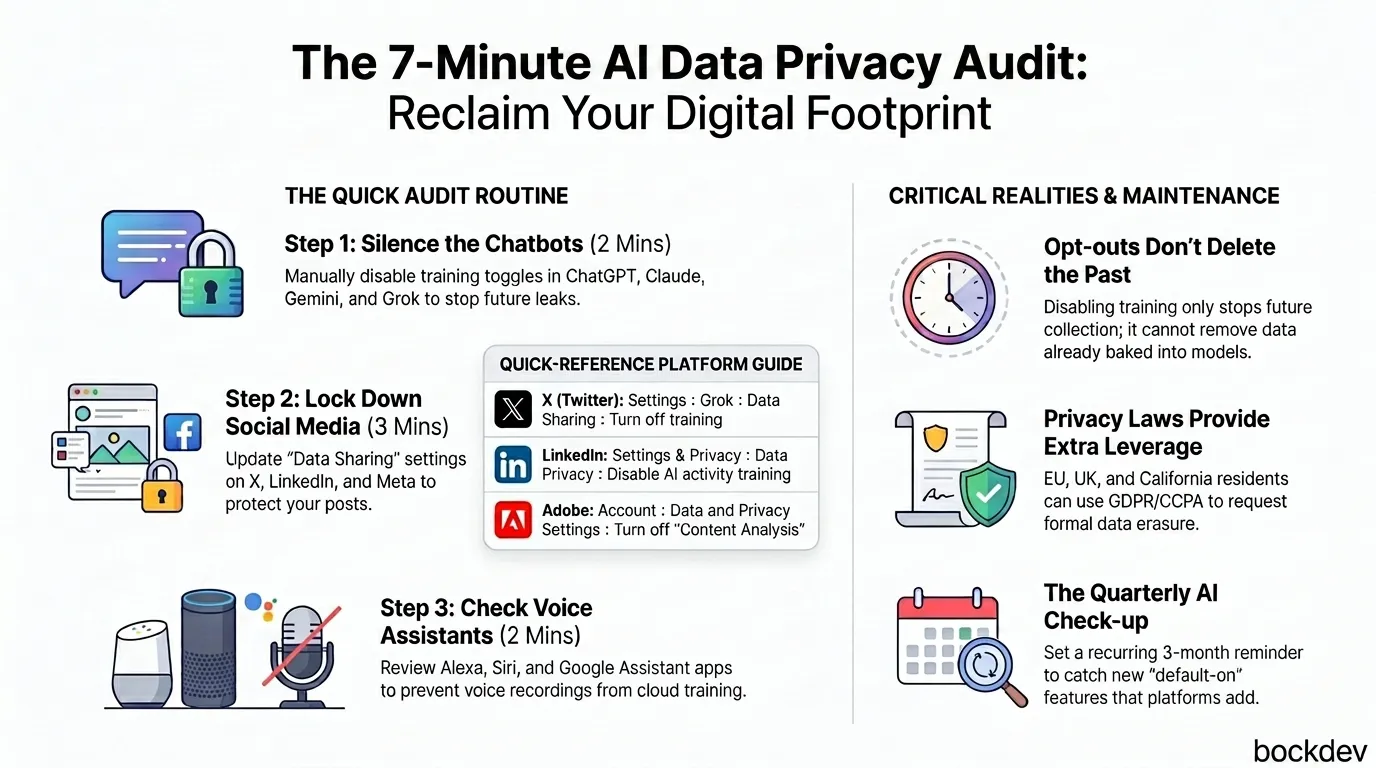
A 7-minute routine to find and limit how AI tools and platforms collect, store, and train on your personal data.
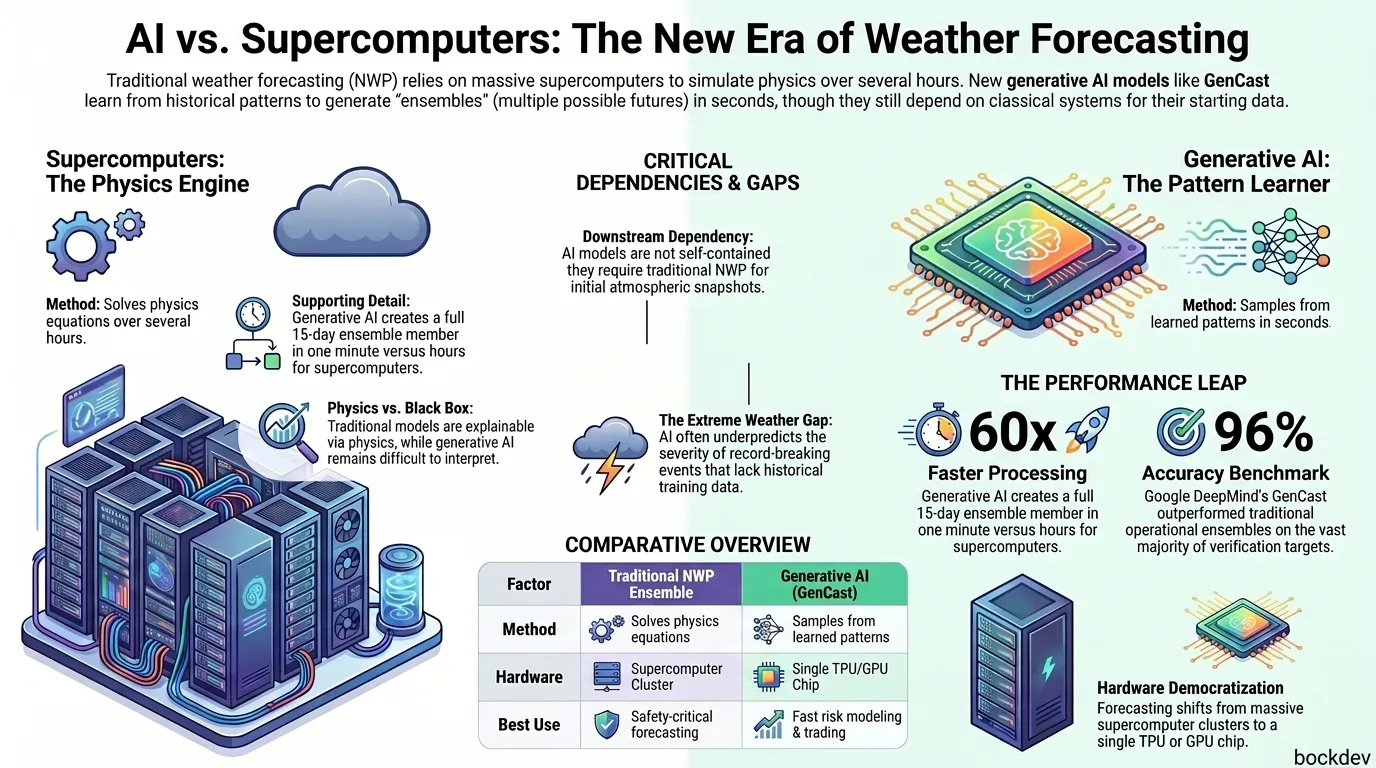
Generative AI models like GenCast now create weather ensembles in minutes instead of hours, changing how forecasts are built and used.
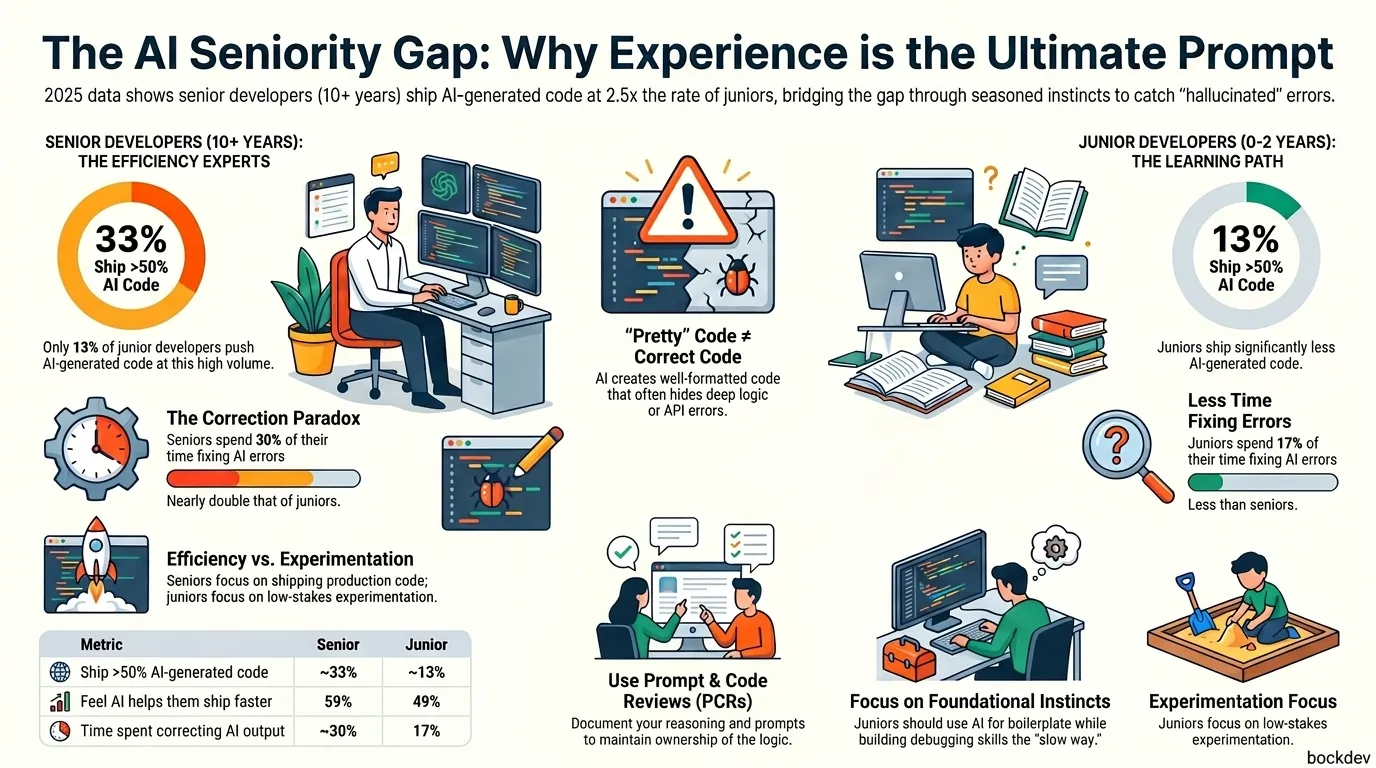
Senior developers ship more AI generated code than juniors. Here's the data, the reasons behind it, and what junior devs should do differently.