
What’s New in Claude Opus 5? The Most Surprising Changes Explained
Explore Claude Opus 5's frontier capabilities, from deep reasoning to mid-conversation tool changes.
AnthropicClaudeOpus 5

Master Claude prompt engineering with best practices for XML tags, structured outputs, adaptive thinking, tool use, and few-shot examples.
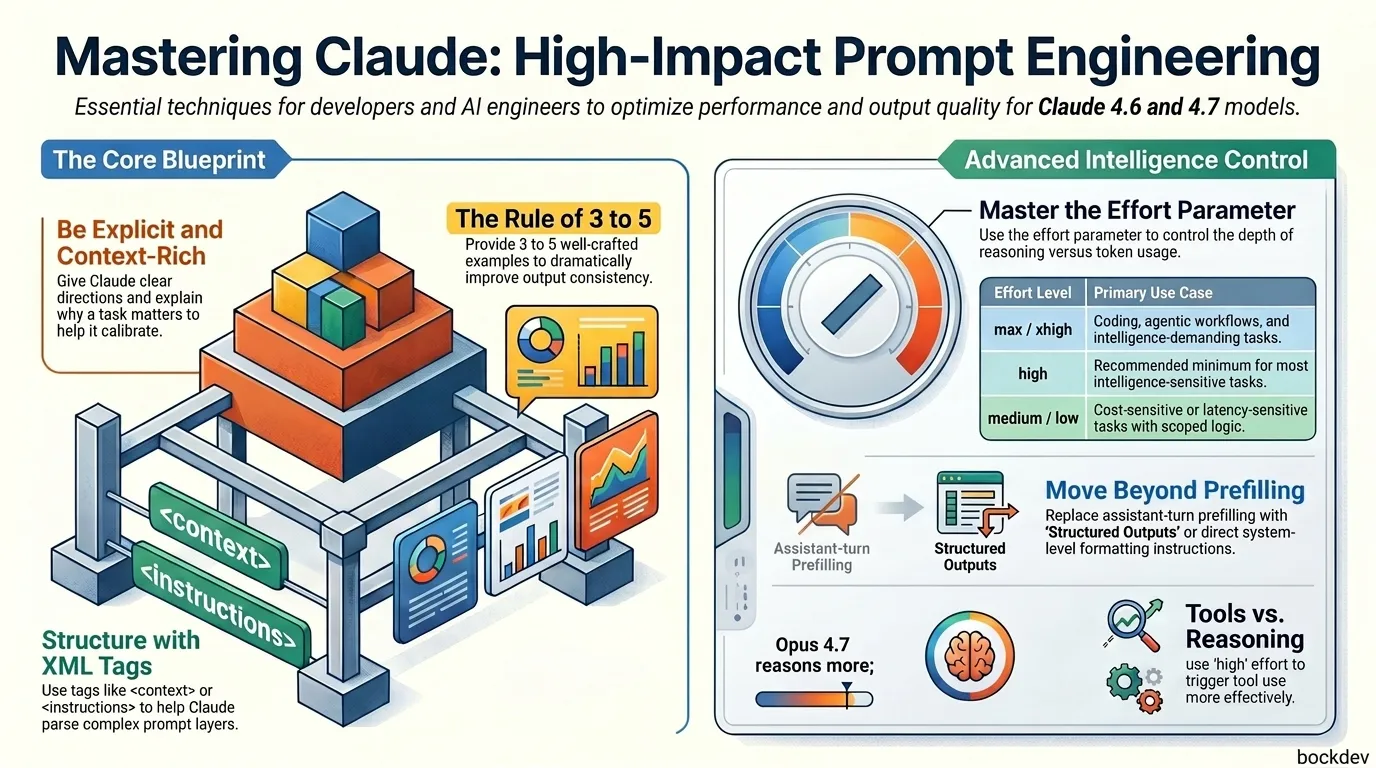
You write a prompt. Claude gives you something... okay. Not wrong, but not quite right either. It is too long, too vague, or it does something you did not ask for. You tweak it. Try again. Still off. Sound familiar?
The problem is usually not Claude. It is the prompt. Claude is powerful, but it works best when you give it clear direction. Think of it like briefing a sharp new hire who just started: they are smart, but they do not know your context, your standards, or what "good" looks like for you yet. The more specific you are, the better the output.
This guide covers the most important prompting techniques for Claude's latest models, including Opus 4.7, Sonnet 4.6, and Haiku 4.5. If you need a platform-agnostic set of patterns, you can check out our universal prompt playbook. We also have a detailed guide on GPT-5.5 prompting if you are working across multiple model providers. Whether you are building an API product, running agentic workflows, or just trying to get better everyday results, this is your reference.
Opus 4.7 is the most capable Claude model available. Most Opus 4.6 prompts work fine on it out of the box, but a few behaviors are worth knowing.
Opus 4.7 adjusts its response length based on how complex it judges your task to be. Simple questions get short answers. Open-ended analysis gets long ones. If you need a specific verbosity, say so:
Provide concise, focused responses. Skip non-essential context and keep examples minimal.Opus 4.7 supports an effort parameter that controls how deeply the model thinks vs. how many tokens it uses. Here is a quick breakdown:
| Effort Level | Best For |
|---|---|
max | Intelligence-demanding tasks; may overthink |
xhigh | Coding and agentic use cases |
high | Most intelligence-sensitive tasks (recommended minimum) |
medium | Cost-sensitive tasks where some intelligence tradeoff is okay |
low | Short, scoped, latency-sensitive tasks |
If you see shallow reasoning, raise the effort level rather than trying to prompt around it. If you need to stay at low for speed, add targeted guidance:
This task involves multi-step reasoning. Think carefully through the problem before responding.At max or xhigh effort, set a large max output token budget (start at 64k) to give the model room to think and call tools.
Opus 4.7 tends to reason more and reach for tools less compared to 4.6. This is usually better, but if your workflow depends on tool calls, raise effort to high or xhigh, or explicitly describe when and why the model should use specific tools:
When the user asks about current prices, always use the web_search tool. Do not estimate or guess.Opus 4.7 follows instructions more literally than 4.6. It will not silently apply a rule to cases you did not mention. If you want a formatting rule applied everywhere, say "everywhere":
Apply this JSON formatting to every section in the response, not just the first one.Opus 4.7 has a default design style: warm cream backgrounds, serif fonts, italic accents, terracotta tones. This looks great for editorial or hospitality use cases. For dashboards, dev tools, or enterprise apps, it will feel wrong.
Generic instructions like "don't use cream" tend to just shift it to a different fixed palette. Two approaches that actually work:
Option 1: Give a concrete spec
Color palette: #E9ECEC, #C9D2D4, #8C9A9E, #44545B, #11171B.
Typography: square, angular sans-serif with wide letter spacing.
Layout: clean horizontal sections, 4px corner radius, generous margins.
Option 2: Ask for options first
Before building, propose 4 distinct visual directions for this brief (each as: bg hex / accent hex / typeface, one-line rationale). Ask me to pick one, then build only that direction.Claude follows explicit instructions well. If you want thorough output, ask for it. Do not rely on vague prompts and hope Claude infers your intent.
A useful test: show your prompt to a colleague with no context on the task. If they would be confused, Claude will be too.
Less effective:
Create an analytics dashboard.

More effective:
Create an analytics dashboard. Include as many relevant features and interactions as possible. Go beyond the basics to create a fully-featured implementation.Telling Claude why something matters helps it calibrate better than just stating the rule.
Less effective:
NEVER use ellipses.

More effective:
Your response will be read aloud by a text-to-speech engine, so never use ellipses. The engine cannot pronounce them.<examples>) A few well-crafted examples (called few-shot prompting) can dramatically improve consistency. Wrap them in <example> tags so Claude treats them as examples, not instructions.
Tips for good examples:
XML tags help Claude parse complex prompts, especially when you mix instructions, context, examples, and inputs. Wrap each content type in its own tag:
<instructions>Summarize each document in 2 sentences.</instructions>

<documents>
  <document index="1">
    <source>report_q3.pdf</source>
    <document_content>{{REPORT}}</document_content>
  </document>
</documents>A single sentence in the system prompt can sharpen Claude's focus:
client.messages.create(
    model="claude-opus-4-7",
    max_tokens=1024,
    system="You are a helpful coding assistant specializing in Python.",
    messages=[
        {"role": "user", "content": "How do I sort a list of dictionaries by key?"}
    ],
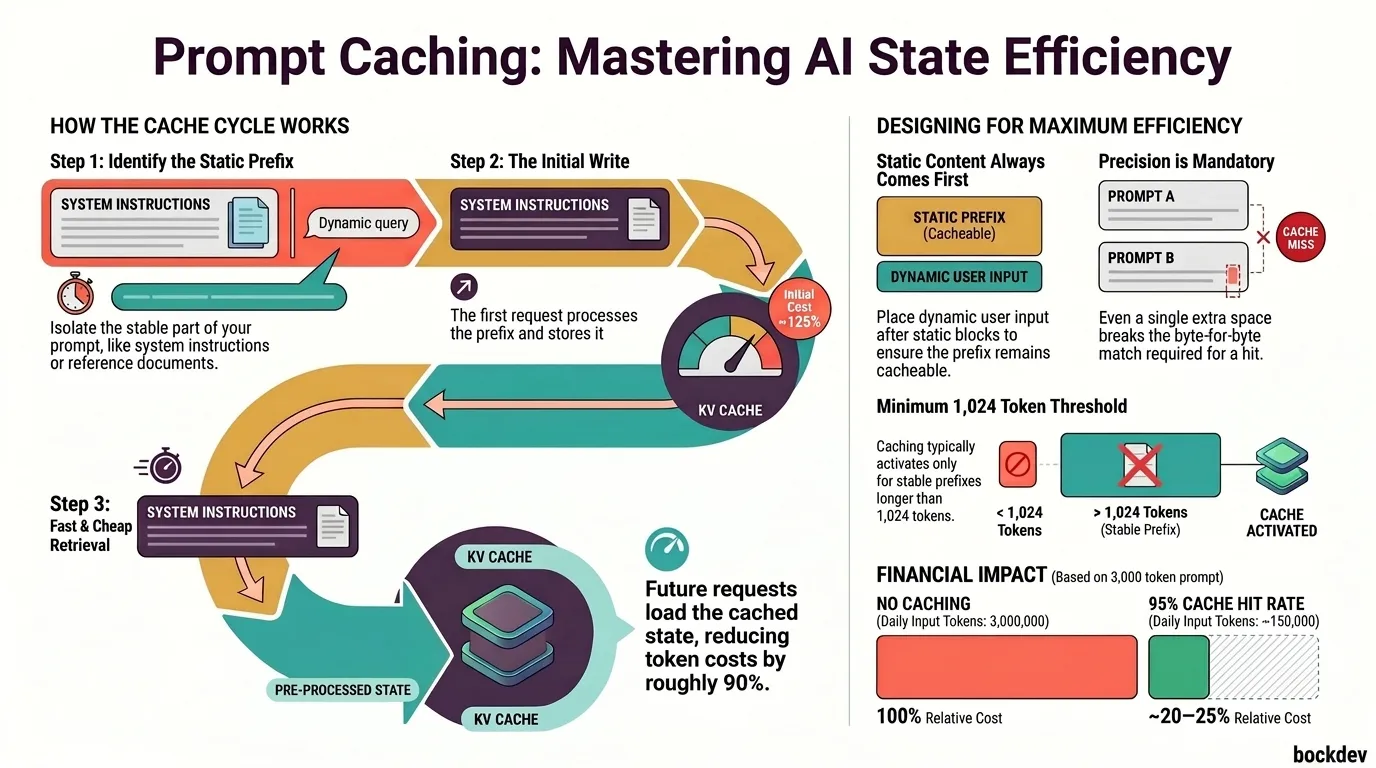
)When dealing with large contexts, token costs can accumulate quickly. Utilizing prompt caching is essential here to store the static parts of your context and avoid paying for them repeatedly.
For large documents, follow these rules:
<document> tags with <source> and <document_content> subtags<documents>
<document index="1">
<source>patient_records.txt</source>
<document_content>{{PATIENT_RECORDS}}</document_content>
</document>
</documents>
Find quotes from the patient records relevant to the reported symptoms. Place them in <quotes> tags. Then list diagnostic information in <info> tags.Putting your query at the end of a long prompt can improve response quality by up to 30%.
Claude's latest models are more concise by default. If you want detailed summaries after tool calls, ask for them explicitly:
After completing a task that involves tool use, provide a quick summary of what you did.Tell Claude what to do, not just what to avoid:
Instead of: Do not use markdown.
Try: Write your response as smoothly flowing prose paragraphs.
To minimize bullets and lists in long-form writing:
When writing reports or technical explanations, use clear prose paragraphs. Only use lists when presenting truly discrete items or when the user explicitly asks for one. Never output a series of short bullet points.Claude defaults to LaTeX for math. To use plain text instead:
Format all math in plain text. Use "/" for division, "*" for multiplication, and "^" for exponents. Do not use LaTeX or MathJax.Starting with Claude 4.6 models, prefilled responses on the last assistant turn are no longer supported. Here is how to migrate:
| Old Approach | New Approach |
|---|---|
| Prefill to force JSON output | Use Structured Outputs or tell Claude to output JSON directly |
| Prefill to skip preambles | Instruct: "Respond directly without phrases like 'Here is...' or 'Based on...'" |
| Prefill to continue a response | Put the interrupted text in the user turn: "Your response was cut off at [text]. Continue from there." |
This deprecation points to a larger industry transition: the shift from prompt engineering to schema-driven engineering, where strict data formats and API validation replace free-text prompting workarounds.
Claude interprets "Can you suggest changes?" as a request for suggestions, not edits. If you want action, say so:
Less effective: Can you suggest some changes to improve this function?
More effective: Change this function to improve its performance.
To make Claude proactive about taking action by default:
<default_to_action>
By default, implement changes rather than only suggesting them. If the user's intent is unclear, infer the most useful action and proceed, using tools to discover missing details instead of guessing.
</default_to_action>
To make Claude more cautious:
<do_not_act_before_instructions>
Do not jump into implementation unless clearly instructed to. When intent is ambiguous, default to providing information and recommendations rather than making changes.
</do_not_act_before_instructions>Claude's latest models support parallel tool execution. To ensure it always runs independent tool calls in parallel:
<use_parallel_tool_calls>
If you intend to call multiple tools and there are no dependencies between them, make all independent tool calls in parallel. For example, when reading 3 files, run 3 tool calls at the same time. Never use placeholders or guess missing parameters.
</use_parallel_tool_calls>
To slow things down and run sequentially:
Execute operations sequentially with brief pauses between each step to ensure stability.Claude 4.6 and 4.7 models use adaptive thinking, where the model decides when and how much to think based on the effort level and query complexity. This replaces the older budget_tokens approach.
Migrating from extended thinking to adaptive:
# Before (extended thinking)
client.messages.create(
    model="claude-sonnet-4-5-20250929",
    max_tokens=64000,
    thinking={"type": "enabled", "budget_tokens": 32000},
    messages=[{"role": "user", "content": "..."}],
)

# After (adaptive thinking)
client.messages.create(
    model="claude-opus-4-7",
    max_tokens=64000,
    thinking={"type": "adaptive"},
    output_config={"effort": "high"},
    messages=[{"role": "user", "content": "..."}],
)If Claude is thinking too often (which can happen with complex system prompts):
Thinking adds latency and should only be used when it will meaningfully improve answer quality, typically for multi-step reasoning. When in doubt, respond directly.If Claude is under-thinking on complex problems, raise the effort level first. If you need finer control:
This task involves multi-step reasoning. Think carefully through the problem before responding.If Claude is going in circles:
When deciding how to approach a problem, choose an approach and commit to it. Avoid revisiting decisions unless you encounter new information that contradicts your reasoning. Pick one path and see it through.Claude 4.6 and later models can track context across long sessions. If your system automatically compacts context, tell Claude so it does not stop early:
Your context window will be automatically compacted as it approaches its limit. Do not stop tasks early due to token budget concerns. Save your current progress and state before the context window refreshes. Always complete tasks fully.For tasks that span multiple context windows:
{
  "tests": [
    { "id": 1, "name": "authentication_flow", "status": "passing" },
    { "id": 2, "name": "user_management", "status": "failing" }
  ],
  "total": 200,
  "passing": 150,
  "failing": 25
}Session 3 progress:
- Fixed authentication token validation
- Next: investigate user_management test failures
- Do not remove testsWithout guidance, Claude may take hard-to-reverse actions. To add a confirmation step for risky operations:
You are encouraged to take local, reversible actions like editing files or running tests. For actions that are hard to reverse, affect shared systems, or could be destructive (like force-pushing, dropping tables, or sending messages), ask the user before proceeding.Claude 4.6 proactively spawns subagents, sometimes more than needed. To set clear expectations:
Use subagents when tasks can run in parallel, require isolated context, or involve independent workstreams. For simple tasks, single-file edits, or sequential operations, work directly without delegating.Claude sometimes adds abstractions, error handling, or features you did not ask for. To keep it focused:
Avoid over-engineering. Only make changes that are directly requested or clearly necessary.
- Do not add features, refactor, or "improve" code beyond what was asked.
- Do not add docstrings or comments to code you did not change.
- Do not create helpers or abstractions for one-time operations.
The right amount of complexity is the minimum needed for the current task.<investigate_before_answering>
Never speculate about code you have not opened. If the user references a specific file, read the file before answering. Investigate relevant files BEFORE answering questions about the codebase. Never make claims about code without investigating first.
</investigate_before_answering>| Old Behavior | What to Do Now |
|---|---|
| Vague "be thorough" prompts | Be specific about what thoroughness looks like |
| Aggressive tool-triggering language ("MUST use this tool") | Soften to "Use this tool when..." |
Extended thinking with budget_tokens | Migrate to adaptive thinking with the effort parameter |
| Prefilled assistant responses | Use structured outputs or instruction-based alternatives |
| Anti-laziness prompting for earlier models | Dial it back; 4.6+ models are already proactive |
For Sonnet 4.6 specifically: it defaults to high effort (unlike Sonnet 4.5 which had no effort parameter). Explicitly set effort to avoid unexpected latency or token usage:
client.messages.create(
    model="claude-sonnet-4-6",
    max_tokens=8192,
    thinking={"type": "disabled"},
    output_config={"effort": "low"},
    messages=[{"role": "user", "content": "..."}],
)1. How do I make Claude give shorter responses?
Add explicit instructions like "Provide concise, focused responses. Skip non-essential context and keep examples minimal." Positive examples of concise output work better than telling Claude what not to do.
2. What is the difference between high and xhigh effort?
xhigh is best for coding and agentic use cases. high is the recommended minimum for most intelligence-sensitive tasks and balances token usage with quality. Use xhigh when you need maximum tool use and agentic performance.
3. How many examples should I include in a prompt?
Aim for 3 to 5 examples. Fewer may not give Claude enough signal; more can sometimes introduce unintended patterns. Wrap them in <example> tags.
4. When should I use XML tags in my prompt?
Use them whenever your prompt mixes different content types: instructions, examples, context, and user input. Tags like <instructions>, <context>, and <examples> help Claude parse what each section is for.
5. How do I stop Claude from using LaTeX for math?
Add: "Format all math in plain text. Use / for division, * for multiplication, and ^ for exponents. Do not use LaTeX or MathJax."
6. Claude keeps spawning subagents when I do not need them. How do I stop it?
Add explicit guidance: "For simple tasks, single-file edits, or tasks where you need to maintain context across steps, work directly rather than delegating to subagents."
7. My code review setup shows lower recall after upgrading to Opus 4.7. Why?
Opus 4.7 follows filtering instructions more literally. If your prompt says "only report high-severity issues," it may find bugs but not report them. Tell it to report everything and filter downstream: "Report every issue you find, including low-severity ones. Include your confidence level and severity estimate so a downstream filter can rank them."
8. How do I migrate away from prefilled responses?
Depending on your use case: use Structured Outputs for JSON constraints, use system prompt instructions to skip preambles, or move continuation text into the user turn with "Your response was cut off at [text]. Continue from there."
9. What is the best effort level for cost-sensitive production use?
For most applications, medium effort on Sonnet 4.6 is a good balance. For high-volume or latency-sensitive workloads, use low. Always set an explicit effort level rather than relying on defaults.
10. How do I handle tasks that span multiple context windows?
Use structured files (JSON for test results, plain text for progress notes) and git for state tracking. In your prompt, tell Claude that context will be compacted automatically so it does not stop early. Use the first context window to set up a framework, then iterate in subsequent windows.
Tags
Explore Claude Opus 5's frontier capabilities, from deep reasoning to mid-conversation tool changes.
This guide breaks down what's actually new for the Anthropic's latest Sonnet-tier model, Claude Sonnet 5.

Learn how prompt caching works in large language models, why it reduces API costs and latency, and how to design your prompts and system state to take full advantage of it.
A clear breakdown of everything new in Claude Opus 4.8, including fast mode, mid-conversation system messages, lower prompt cache minimum, refusal stop details, and behavior improvements.

Discover why small language models (SLMs) are making a comeback, how they compare to large LLMs in cost, speed, and performance, and when choosing a smaller model is the smarter decision for your AI project.
