
What’s New in Claude Opus 5? The Most Surprising Changes Explained
Explore Claude Opus 5's frontier capabilities, from deep reasoning to mid-conversation tool changes.
AnthropicClaudeOpus 5

A clear breakdown of everything new in Claude Opus 4.8, including fast mode, mid-conversation system messages, lower prompt cache minimum, refusal stop details, and behavior improvements.

If you've been using Claude Opus 4.7 and wondering whether it's time to upgrade, the short answer is yes. Claude Opus 4.8 brings several useful features that directly improve how you build and run AI-powered applications, especially if you're working on long-running agents, high-throughput systems, or complex reasoning tasks.
Some of these changes are small but impactful, like a lower caching threshold that saves you money without changing a single line of code. Others, like fast mode and mid-conversation system messages, open up new ways to design your application flow.
This post walks you through everything that's new, what changed in behavior, and what you need to know before migrating.
Claude Opus 4.8 is Anthropic's most capable generally available model. It's designed for complex reasoning, long-horizon agentic coding, and high-autonomy workflows.
| Feature | Claude Opus 4.8 |
|---|---|
| Context window | 1M tokens (200k on Microsoft Foundry) |
| Max output tokens | 128k |
| Adaptive thinking | Yes |
| Fast mode | Yes (research preview) |
| Min cacheable prompt length | 1,024 tokens |
It's available on the Claude API, Amazon Bedrock, and Vertex AI.
Previously, system prompts had to go at the start of a conversation. Now, with Claude Opus 4.8, you can inject a role: "system" message after a user turn in the middle of a conversation.
This is useful for long-running agentic loops where you need to update instructions without restarting or repeating the full system prompt.
messages = [
    {"role": "system", "content": "You are a helpful assistant."},
    {"role": "user", "content": "Start the task."},
    {"role": "assistant", "content": "Sure, starting now."},
    {"role": "system", "content": "New instruction: prioritize speed over detail."},  # Mid-conversation system message
    {"role": "user", "content": "Continue."}
]
No beta header needed. This also preserves prompt cache hits on earlier turns, which reduces input costs.
When Claude declines a request, the API now returns a stop_details object that describes the category of refusal, alongside the existing stop_reason: "refusal".
This makes it much easier to handle different types of declined requests in your app, such as routing the user to a fallback, showing a specific message, or logging the refusal type.
response = client.messages.create(...)

if response.stop_reason == "refusal":
    category = response.stop_details.get("category")
    print(f"Refusal category: {category}")
    # Route based on category
No beta header required.
The effort parameter now defaults to "high" across all surfaces, including the Claude API and Claude Code. If you've already set effort explicitly in your code, nothing changes for you.
If you haven't set it, Claude Opus 4.8 will now think more deeply by default, which is generally what you want for complex tasks.
# This is now the default behavior, no need to set it explicitly
response = client.messages.create(
    model="claude-opus-4-8",
    messages=[{"role": "user", "content": "Solve this complex problem..."}],
    # effort="high"  # Already the default
)
Fast mode lets you get up to 2.5x higher output tokens per second from Claude Opus 4.8. It's a research preview available on the Claude API.
You enable it by setting speed: "fast" in your request. It comes at premium pricing, but if throughput is your bottleneck, it's worth evaluating.
response = client.messages.create(
    model="claude-opus-4-8",
    messages=[{"role": "user", "content": "Generate a detailed report..."}],
    speed="fast"  # Enables fast mode
)
Check the fast mode docs for current pricing and access requirements.
The minimum cacheable prompt length dropped from the previous threshold down to 1,024 tokens on Claude Opus 4.8.
This means prompts that were too short to cache on Opus 4.7 can now create cache entries automatically, with no code changes required on your end. If you're doing repeated calls with a shared system prompt or long instructions, this quietly reduces your costs.
# A shorter system prompt like this can now be cached
system_prompt = "You are a code review assistant. Review code for bugs, style issues, and security vulnerabilities."

# This prompt is now above the 1,024-token threshold requirement on Opus 4.8
# Caching kicks in automatically when you use prompt caching headersThese are not new. If your code already runs on Opus 4.7, nothing breaks here.
Sampling parameters are still unsupported. Setting temperature, top_p, or top_k to a non-default value returns a 400 error. Omit them and use prompting to guide model behavior instead.
Extended thinking budgets are not supported. Only adaptive thinking is available. If you're migrating from Opus 4.6 or earlier, update your thinking config like this:
# Opus 4.6 and earlier
thinking = {"type": "enabled", "budget_tokens": 32000}

# Opus 4.7 and 4.8 (correct approach)
thinking = {"type": "adaptive"}
output_config = {"effort": "high"}
These apply to the Messages API only. Claude Managed Agents are not affected.
Claude Opus 4.8 targets three specific areas compared to Opus 4.7:
Long-horizon agentic coding. Better long-context handling, fewer compactions, and better recovery when compaction does occur. Long agentic traces stay on task more reliably.
Reasoning effort calibration. The model behaves more consistently at each effort level across different domains. Less unpredictability.
Tool triggering. Fewer cases where the model skips a tool call it was supposed to make. This was a reported issue in Opus 4.7.
These are not breaking API changes, but they may affect your prompts or outputs.
1. Do I need to change my code to migrate from Opus 4.7 to Opus 4.8?
In most cases, no. The API constraints are the same. The main things to check are your thinking config (if you're using extended thinking) and whether your prompts need updating for behavior changes.
2. What is fast mode and should I use it?
Fast mode gives you up to 2.5x higher output tokens per second at premium pricing. Use it if throughput is a bottleneck in your application. It's currently a research preview on the Claude API.
3. Does the lower prompt cache minimum apply automatically?
Yes. If your prompt is at least 1,024 tokens and you're using prompt caching, it will cache automatically with no code changes needed.
4. Can I still set temperature or top_p on Opus 4.8?
No. Setting these to non-default values will return a 400 error, same as Opus 4.7. Use prompting to influence model behavior instead.
5. What is adaptive thinking and how do I enable it?
Adaptive thinking lets the model decide per turn whether it needs to reason before responding. Enable it by setting thinking: {"type": "adaptive"} in your request. It's the only supported thinking mode on Opus 4.8.
6. What context window size does Opus 4.8 support?
1 million tokens on the Claude API, Amazon Bedrock, and Vertex AI. 200k tokens on Microsoft Foundry.
7. What does the refusal stop_details object tell me?
It provides the category of the refusal, which helps your application distinguish between different types of declined requests and route the user or handle the response accordingly.
8. Is extended thinking budget (budget_tokens) supported?
No. Setting thinking: {"type": "enabled", "budget_tokens": N} returns a 400 error. Use {"type": "adaptive"} with the effort parameter instead.
9. What effort level does Opus 4.8 default to?
"high" across all surfaces including the Claude API and Claude Code. If you've set it explicitly, your setting is unchanged.
10. Where can I find the full migration guide?
Anthropic has a dedicated migration guide for moving from Claude Opus 4.7 to 4.8. If you use Claude Code or the Agent SDK, the Claude API skill can apply migration steps to your codebase automatically.
Tags
Explore Claude Opus 5's frontier capabilities, from deep reasoning to mid-conversation tool changes.
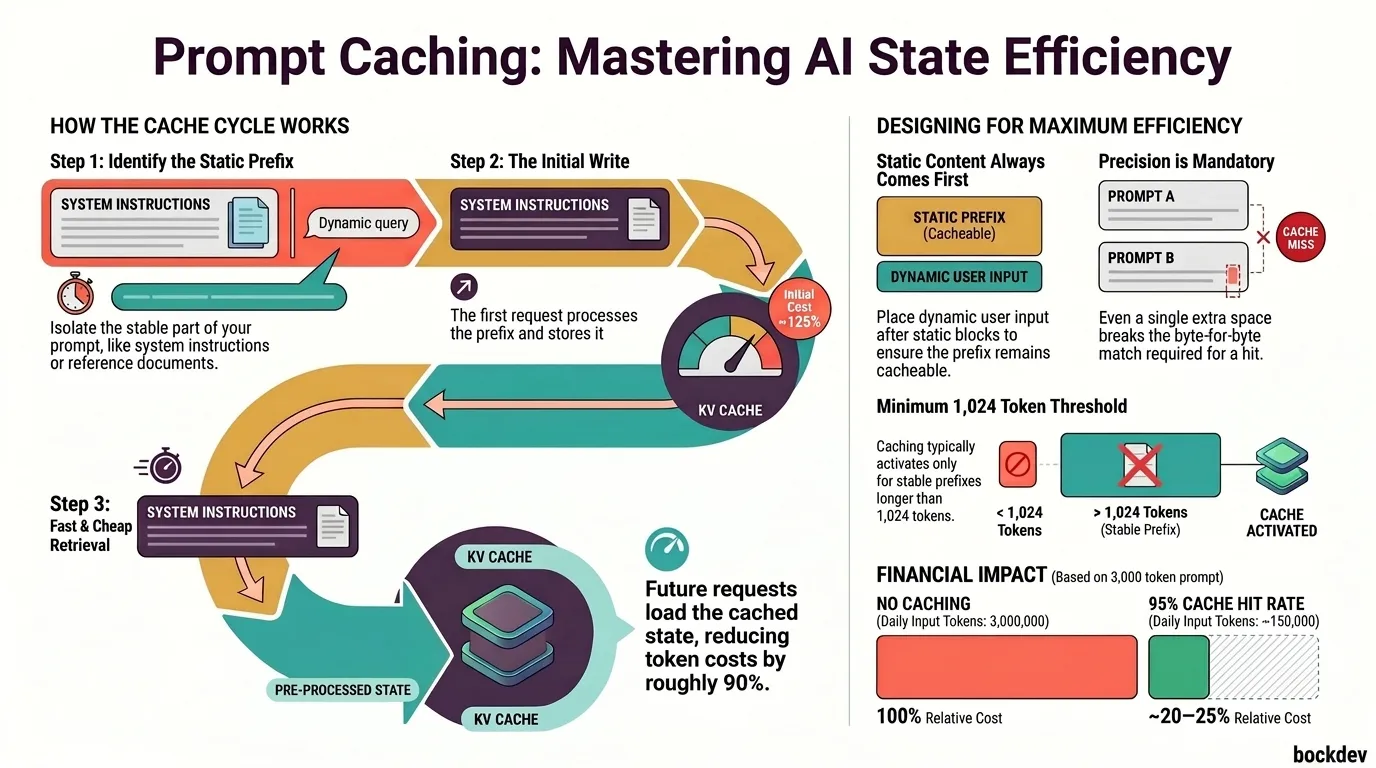
Learn how prompt caching works in large language models, why it reduces API costs and latency, and how to design your prompts and system state to take full advantage of it.
Get the complete recap of Anthropic's April 2026 updates: Claude Opus 4.7, Claude Design, multi-gigawatt compute partnerships, and global expansions.

Discover 8 complex, real-world tasks ideal for Claude Fable 5, from large-scale code migrations to deep financial analysis and frontier research, and learn where its safety guardrails apply.

This guide breaks down what's actually new for the Anthropic's latest Sonnet-tier model, Claude Sonnet 5.
