
What’s New in Claude Opus 5? The Most Surprising Changes Explained
Explore Claude Opus 5's frontier capabilities, from deep reasoning to mid-conversation tool changes.
AnthropicClaudeOpus 5

Learn how prompt caching works in large language models, why it reduces API costs and latency, and how to design your prompts and system state to take full advantage of it.
You are building an AI-powered app. Every request sends the same long system prompt, the same document context, the same set of instructions. And every single time, the model reads all of it from scratch. You are paying for the same tokens over and over again, contributing to the broader token burn crisis that is impacting development budgets.
This is not just expensive. It is slow. As your context grows, so does your latency. Users notice. Bills grow, especially when concurrent requests trigger massive consumption spikes. And the worst part is that most of this cost is completely avoidable.
Prompt caching is the fix. It lets the model save and reuse parts of the input it has already processed, so you only pay full price once. If you are building anything with long system prompts, tools, documents, or multi-turn conversations, understanding how prompt caching works is one of the highest-leverage things you can learn.
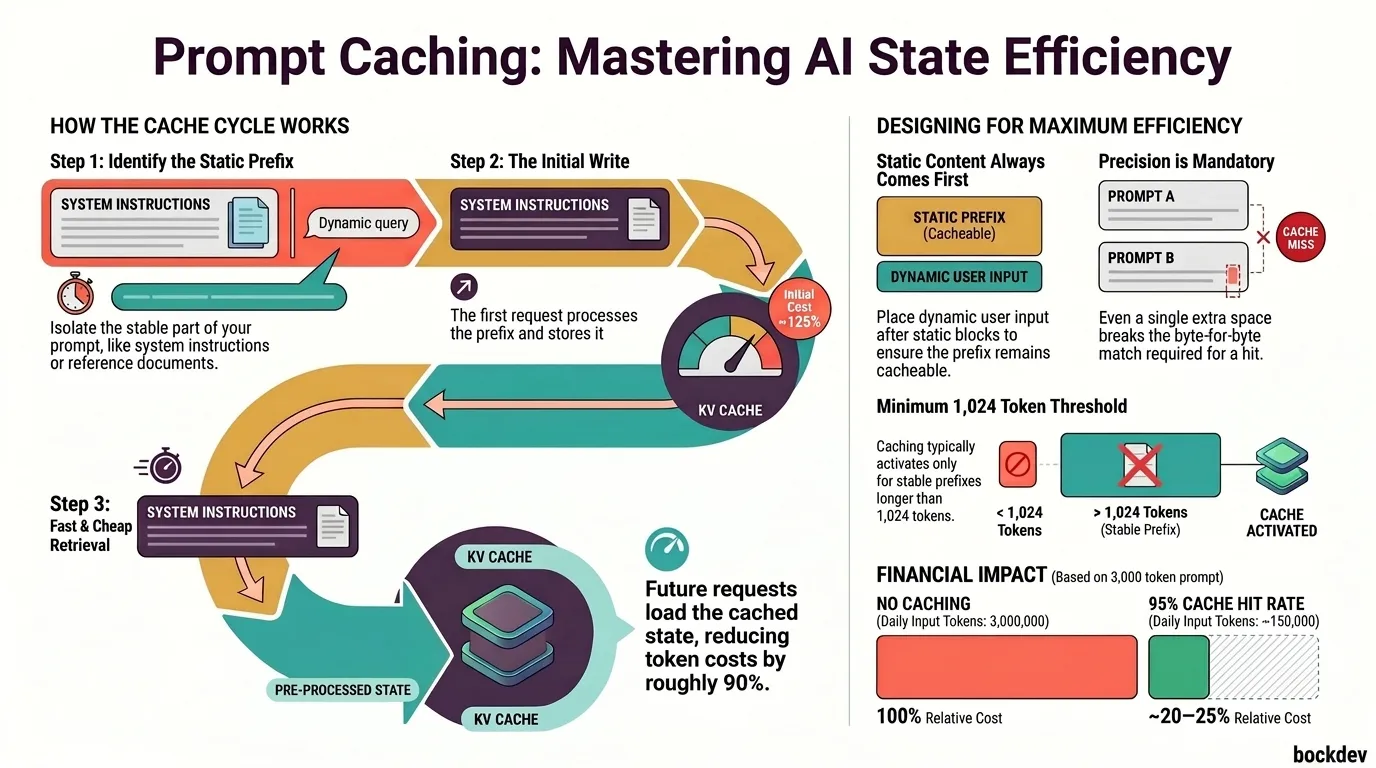
Prompt caching is a feature that allows AI APIs (like Anthropic's Claude) to store the processed state of your prompt prefix in memory. When the same prefix appears in a future request, the model skips reprocessing it and loads the cached version instead.
Think of it like a browser cache. The first visit loads everything fresh. On the next visit, the static assets are already stored, so only new content needs to load.
In LLM terms, the "static asset" is your KV (key-value) cache, which is the intermediate computation state from the attention layers. Caching this state means the model does not rerun the expensive transformer computation for the parts of the prompt that have not changed. (For a deep dive on how alternative architectures attempt to eliminate the quadratic cost of the KV cache, see our post on State-Space Models vs. Transformers.)
When a transformer model processes your input, it produces a KV cache for every token. This cache is what enables attention to work across the whole context.
Prompt caching works by:
The key constraint: the prefix must be byte-for-byte identical for the cache to hit. Any change to the cached portion, even a single space, breaks the cache and triggers a full recompute.
Here is a simplified view of what happens at the API level:
Request 1 (cache miss):
[System Prompt: 2000 tokens] + [User message: 50 tokens]
→ Full processing: 2050 input tokens billed at standard rate
→ KV cache saved for the 2000-token prefix

Request 2 (cache hit):
[System Prompt: 2000 tokens - CACHED] + [User message: 50 tokens]
→ Only 50 tokens billed at standard rate
→ 2000 tokens billed at a much lower cache read rate
With Anthropic's API, cache read tokens are billed at about 10% of the normal input token cost. Cache write tokens (the first request) cost slightly more than normal, around 125%. But over multiple requests, the savings compound quickly.
To use prompt caching with Claude, you add a cache_control parameter to the content blocks you want cached.
import anthropic

client = anthropic.Anthropic()

response = client.messages.create(
    model="claude-opus-4-5",
    max_tokens=1024,
    system=[
        {
            "type": "text",
            "text": "You are an expert software engineer. Your job is to help developers debug, review, and improve their code. Always explain your reasoning step by step.",
            "cache_control": {"type": "ephemeral"}
        }
    ],
    messages=[
        {"role": "user", "content": "What is a race condition?"}
    ]
)
The cache_control: { type: "ephemeral" } tells the API to cache this block. On the first call, the system prompt is written to cache. On subsequent calls with the same system prompt, the cached version is used.
If you are passing a long document in every request (for RAG, Q&A, or document analysis), cache it:
with open("large_document.txt", "r") as f:
    document_text = f.read()

response = client.messages.create(
    model="claude-opus-4-5",
    max_tokens=1024,
    system=[
        {
            "type": "text",
            "text": "You are a document analyst. Answer questions based only on the provided document.",
            "cache_control": {"type": "ephemeral"}
        }
    ],
    messages=[
        {
            "role": "user",
            "content": [
                {
                    "type": "text",
                    "text": document_text,
                    "cache_control": {"type": "ephemeral"}
                },
                {
                    "type": "text",
                    "text": "What are the key findings in section 3?"
                }
            ]
        }
    ]
)
The document is cached after the first request. Every follow-up question about the same document hits the cache instead of reprocessing thousands of tokens.
Cache hits depend on a few conditions:
| Condition | Required? | Notes |
|---|---|---|
| Exact prefix match | Yes | Byte-for-byte, including whitespace |
| Same model | Yes | Cache is model-specific |
| Cache TTL not expired | Yes | Typically 5 minutes for ephemeral |
| Same API key / account | Yes | Cache is not shared across accounts |
| Prefix above minimum length | Yes | Around 1024 tokens for Claude |
The minimum cacheable prefix is important. If your system prompt is only 100 tokens, caching will not activate. You need enough tokens in the stable prefix to make caching worthwhile.
The structure of your prompt matters as much as the content. Here are the key design principles.
The cache only applies to a prefix, so anything you want cached must come before the dynamic parts of the prompt.
Good structure:
[Static system instructions]      ← CACHED
[Static document or context]      ← CACHED
[Dynamic user message]            ← NOT CACHED (changes every turn)
Bad structure:
[Dynamic user message]
[Static system instructions]
If the dynamic content comes first, nothing gets cached.
Even minor formatting changes break the cache. Pick a format and stick to it across all requests.
# Consistent - will cache hit
system_prompt = "You are a helpful assistant. Always be concise."

# This breaks the cache on the second call
system_prompt = "You are a helpful assistant. Always be concise." # extra spaceFor chat applications, you want to cache the growing conversation history up to the most recent exchange. The last user message always stays outside the cache since it changes. Caching conversation history helps maintain long context without spiraling costs, though developers must still manage potential context drift as session length grows.
messages = [
    {"role": "user", "content": [
        {"type": "text", "text": "Hello, let's discuss Python.", "cache_control": {"type": "ephemeral"}}
    ]},
    {"role": "assistant", "content": "Sure! What would you like to know about Python?"},
    {"role": "user", "content": [
        {"type": "text", "text": "Tell me about list comprehensions.", "cache_control": {"type": "ephemeral"}}
    ]},
    {"role": "assistant", "content": "List comprehensions are a concise way to create lists..."},
    {"role": "user", "content": "Can you show me an example?"}  # new message, no cache
]
By placing cache_control on the earlier messages, the model can reuse the processed history for each new turn.
Here is a practical comparison of what prompt caching looks like for a real use case: a customer support bot with a 3,000-token system prompt, handling 1,000 user messages per day.
| Scenario | Input Tokens/Day | Effective Cost (Relative) |
|---|---|---|
| No caching | 3,000,000 | 100% |
| Caching with 95% hit rate | ~150,000 standard + 2,850,000 cache reads | ~20-25% |
Beyond cost, cache hits are also faster. The model skips large portions of the prefill computation, which reduces time-to-first-token, especially noticeable with large context windows.
Placing dynamic content before static content. The cache is a prefix match. If anything changes at the start, the rest cannot be cached.
Changing system prompts between requests. Even adding a timestamp or session ID to your system prompt will bust the cache every time.
Not meeting the minimum token threshold. A 200-token system prompt will not benefit from caching. Combine multiple stable instructions into one block if needed.
Assuming cross-session persistence. Ephemeral cache has a short TTL (about 5 minutes for Claude). For long-running sessions with large gaps, you may encounter cache misses more than expected.
| Strategy | How it Reduces Cost | Best For |
|---|---|---|
| Prompt caching | Reuses processed prefix KV state | Repeated long contexts |
| Shorter prompts | Fewer tokens per request | All use cases |
| Batching | Processes multiple requests together | High-volume offline tasks |
| Smaller models | Lower per-token cost | Simpler tasks |
| Output length control | Fewer output tokens billed | Verbose responses |
Prompt caching is not a replacement for writing efficient prompts. It is most powerful when combined with clear, tight instructions. For even deeper optimization, model-level techniques like attention head pruning can be used to physically shrink models for local or edge execution.
1. Does prompt caching work with all Claude models?
Prompt caching is supported on Claude 3 and later models via the Anthropic API. Check the official documentation for the latest list of supported models, as availability can change with new releases.
2. How long does the cache last?
Anthropic's ephemeral cache currently has a TTL of around 5 minutes. If more than 5 minutes pass between requests using the same prefix, a cache miss will occur and the prefix will be reprocessed.
3. Is cache read always cheaper than a normal input token?
Yes. With Anthropic's API, cache reads are billed at roughly 10% of the standard input token price. Cache writes cost slightly more than standard at around 125%, but the savings on subsequent reads quickly offset that.
4. Can I cache tool definitions or function schemas?
Yes. Tool definitions are part of the input and can be included in a cached prefix. This is useful if you have a large set of tools that rarely changes.
5. What happens if my prefix changes slightly between requests? The cache will miss entirely. Even a single character difference breaks the prefix match. The entire cached portion is reprocessed as a standard input.
6. Does caching affect output quality?
No. Caching only affects how the input is processed. The model's output quality, reasoning, and response are identical whether the input was served from cache or processed fresh.
7. Can I see cache hit or miss information in the API response?
Yes. The Anthropic API returns usage metadata that includes cache_creation_input_tokens and cache_read_input_tokens, so you can track cache performance on each request.
8. Is prompt caching available when using the streaming API?
Yes. Prompt caching works with both streaming and non-streaming requests.
9. What is the minimum prompt size needed for caching to activate?
The minimum cacheable prefix length is around 1,024 tokens for Claude models. Shorter prefixes will not be cached even if you include the cache_control parameter.
10. Should I cache the entire conversation history?
You should cache the stable, earlier parts of the conversation. The most recent user message should always remain outside the cache since it changes with every request. Mark earlier turns with cache_control and leave the latest user input uncached.
Vaswani et al., Attention Is All You Need (2017) - https://arxiv.org/abs/1706.03762
Anthropic Prompt Caching Documentation - https://docs.anthropic.com/en/docs/build-with-claude/prompt-caching
Optimizing your LLM in production - https://huggingface.co/blog/optimize-llm
Tags
Explore Claude Opus 5's frontier capabilities, from deep reasoning to mid-conversation tool changes.
A clear breakdown of everything new in Claude Opus 4.8, including fast mode, mid-conversation system messages, lower prompt cache minimum, refusal stop details, and behavior improvements.

Get the complete recap of Anthropic's April 2026 updates: Claude Opus 4.7, Claude Design, multi-gigawatt compute partnerships, and global expansions.

Discover 8 complex, real-world tasks ideal for Claude Fable 5, from large-scale code migrations to deep financial analysis and frontier research, and learn where its safety guardrails apply.

This guide breaks down what's actually new for the Anthropic's latest Sonnet-tier model, Claude Sonnet 5.
