
What’s New in Claude Opus 5? The Most Surprising Changes Explained
Explore Claude Opus 5's frontier capabilities, from deep reasoning to mid-conversation tool changes.
AnthropicClaudeOpus 5

Learn how to set up and use Claude Cowork on your desktop. Automate multi-step tasks, schedule routines, manage files, and run code in isolated VMs.

You've probably used Claude to answer questions or draft content. But what if Claude could actually do the work for you, not just talk about it?
Most AI tools respond to one prompt at a time. You ask, they answer, and then you take over. That's fine for simple tasks. But when you need to organize hundreds of files, build a spreadsheet with working formulas, or pull research from multiple sources into a polished report, a back-and-forth chat just doesn't cut it.
That's exactly what Claude Cowork is built for. It's a mode inside the Claude Desktop app that lets Claude take on complex, multi-step tasks and run them from start to finish on your computer, including reading and writing your local files.
Claude Cowork brings the same agentic engine behind Claude Code into a desktop interface you don't need a terminal to use. Instead of responding to one prompt, Claude can plan a task, break it into steps, run code safely in an isolated virtual machine, and deliver finished outputs directly to your file system.
Think of it like hiring an assistant who can actually open your folders, do the work, and hand you a finished file.
Cowork is available on Claude Desktop for macOS and Windows, and requires a paid plan (Pro, Max, Team, or Enterprise).
| Feature | Regular Chat | Claude Cowork |
|---|---|---|
| Multi-step task execution | No | Yes |
| Local file access | No | Yes |
| Runs code on your computer | No | Yes (isolated VM) |
| Scheduled/recurring tasks | No | Yes |
| Long-running sessions | Limited | Yes |
| Mobile task assignment | No | Yes (Pro/Max) |
| Projects with persistent context | No | Yes |
| Shares sessions with others | Yes | No |
When you give Cowork a task, here's what happens under the hood:
You stay in the loop throughout. You can watch Claude's progress, step in to redirect it, or just walk away and come back to finished work.
Important: The Claude Desktop app must stay open while Cowork is running. Closing the app or letting your computer sleep will stop the task.
Requirements:
Steps:
That's it. No terminal, no setup scripts, no manual file uploads.
You can give Claude standing instructions that apply to all your Cowork sessions. This is useful for setting your preferred tone, output format, or background context about your role.
To add global instructions:
Example:
I'm a marketing manager. Always output documents in a professional tone.
Prefer .docx for reports and .xlsx for data. Use British English spelling.
You can also set folder-level instructions when you connect a local folder. These give Claude project-specific context for that workspace.
Cowork lets you set up tasks that run automatically on a schedule or on demand.
To create a scheduled task, type /schedule in any Cowork task prompt. You can also manage your scheduled tasks from the Scheduled section in the left sidebar.
Example scheduled task prompt:
/schedule every Monday at 8am
Summarize all new files added to my /Reports/Inbox folder last week
and write a digest to /Reports/Weekly-Summary.md
Scheduled tasks only run while your computer is awake and Claude Desktop is open.
File and Document Management
YYYY-MM-DDResearch and Analysis
Document Creation
Data Work
Cowork is designed to be powerful but controlled:
Permission Modes:
| Mode | What It Does | When to Use |
|---|---|---|
| Ask before acting | Claude pauses for your approval at each step | New tools, sensitive files, unfamiliar tasks |
| Act without asking | Claude works without pausing | When you're actively watching and trust the setup |
Both modes still require your approval before any file deletions.
Projects let you group related tasks into a self-contained workspace with its own files, links, instructions, and memory.
This is especially useful for recurring work. Instead of re-explaining context every time, your project remembers it.
Note: Memory is supported inside projects but is not carried over across standalone Cowork sessions.
Cowork tasks consume more of your usage allocation than regular chat. Complex, multi-step tasks are compute-heavy and use more tokens.
To get the most out of your limits:
"Setting up Claude's workspace" keeps showing This is normal. Cowork is downloading the latest update before starting.
Claude stopped mid-task The desktop app was likely closed or your computer went to sleep. Keep the app open for the full duration of the task.
Files not showing up where expected Check that you granted Claude access to the right folder, and look at the output path Claude specified when it finished.
Windows: "VM service not running" This usually means you installed via the older .exe installer instead of MSIX. Reinstall from claude.com/download, or start the service manually:
sc start CoworkVMServiceOr for Microsoft Store installs:
sc start CoworkVMServiceStoreWindows: "EXDEV: cross-device link not permitted" This happens when your Windows storage settings point to a different drive (like D:\ instead of C:). Fix it by going to Settings > System > Storage and setting new content to save on C:, then uninstall and reinstall Cowork.
1. Do I need to know how to code to use Cowork?
No. Cowork is designed for knowledge workers, not developers. You describe what you want in plain language and Claude handles the execution.
2. Can I use Cowork on the web version of Claude?
No. Cowork requires the Claude Desktop app on macOS or Windows. It is not available on claude.ai or the mobile app (though Pro and Max users can assign tasks from mobile while the desktop app runs the work).
3. Is it safe to let Claude access my local files?
Yes, with caveats. Claude can only access folders you explicitly connect. All code runs in an isolated VM. Claude also asks your permission before deleting any files. Review Claude's plan before running tasks on sensitive data.
4. What happens if my computer goes to sleep while Cowork is running?
The task stops. You need your computer to stay awake and the Claude Desktop app to remain open for the full duration of any active task.
5. Can Cowork access the internet?
Yes. Cowork can search the web and fetch URLs, but this runs server-side and is subject to your network egress settings. Team and Enterprise admins can disable web search in organization settings.
6. How is Cowork different from just chatting with Claude? Regular chat is one prompt, one response. Cowork lets Claude plan, execute, iterate, and deliver finished work across multiple steps, including reading and writing your actual local files.
7. Can I run Cowork tasks on a schedule?
Yes. Type /schedule in any Cowork task to set up recurring or on-demand scheduled tasks. The app must be open and your computer must be awake for scheduled tasks to run.
8. What kinds of files can Cowork create?
Cowork can produce Excel spreadsheets (with real formulas), PowerPoint presentations, Word documents, markdown files, CSV files, and more. Spreadsheets and slides can also be further edited using Claude for Excel and Claude for PowerPoint.
9. Does Cowork remember context between sessions?
Only within Projects. Standalone Cowork sessions do not retain memory after they end. If you want persistent context, organize your work into a Cowork project.
10. What if I hit my usage limit while using Cowork?
Cowork is more resource-intensive than chat. If you hit limits often, batch related work into fewer sessions, use standard chat for simple tasks, and monitor your usage under Settings > Usage.
Tags
Explore Claude Opus 5's frontier capabilities, from deep reasoning to mid-conversation tool changes.
This guide breaks down what's actually new for the Anthropic's latest Sonnet-tier model, Claude Sonnet 5.

Learn how prompt caching works in large language models, why it reduces API costs and latency, and how to design your prompts and system state to take full advantage of it.
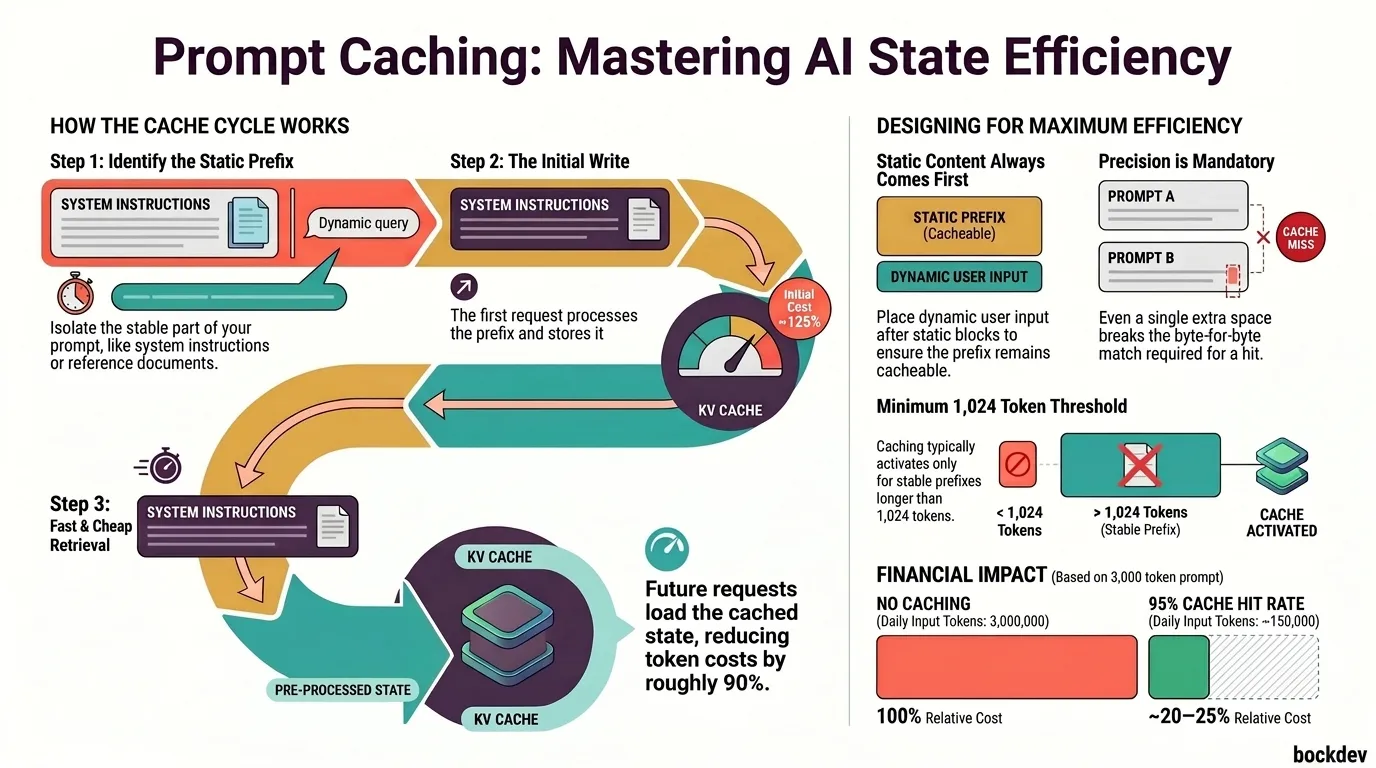
A clear breakdown of everything new in Claude Opus 4.8, including fast mode, mid-conversation system messages, lower prompt cache minimum, refusal stop details, and behavior improvements.

Agentic AI consumes tokens at a rate 50 to 1,000 times higher than simple chatbots, causing cloud bills to spiral out of control for many organizations. This post explains what the token burn crisis is, why it happens, and how companies are responding by shifting AI workloads from the cloud to the edge.
