Claude Code Tutorial: Practical Workflows & Examples
Learn how to use Claude Code for everyday developer workflows: exploring codebases, debugging, refactoring, running tests, and automating scripts.
You just cloned a repo you've never seen before. No README worth reading, no senior dev to ask, and a deadline that isn't moving. Or maybe you're mid-debug, your context is a mess, and you're not even sure where the bug started.
Claude Code was built for exactly these situations. It works like a pair programmer that lives in your terminal, reads your files, runs your tests, and keeps up with your project the way a good teammate would.
This guide cuts straight to the workflows you'll actually use every day, with the exact prompts and commands that make them work.
Exploring an Unfamiliar Codebase with Claude Code
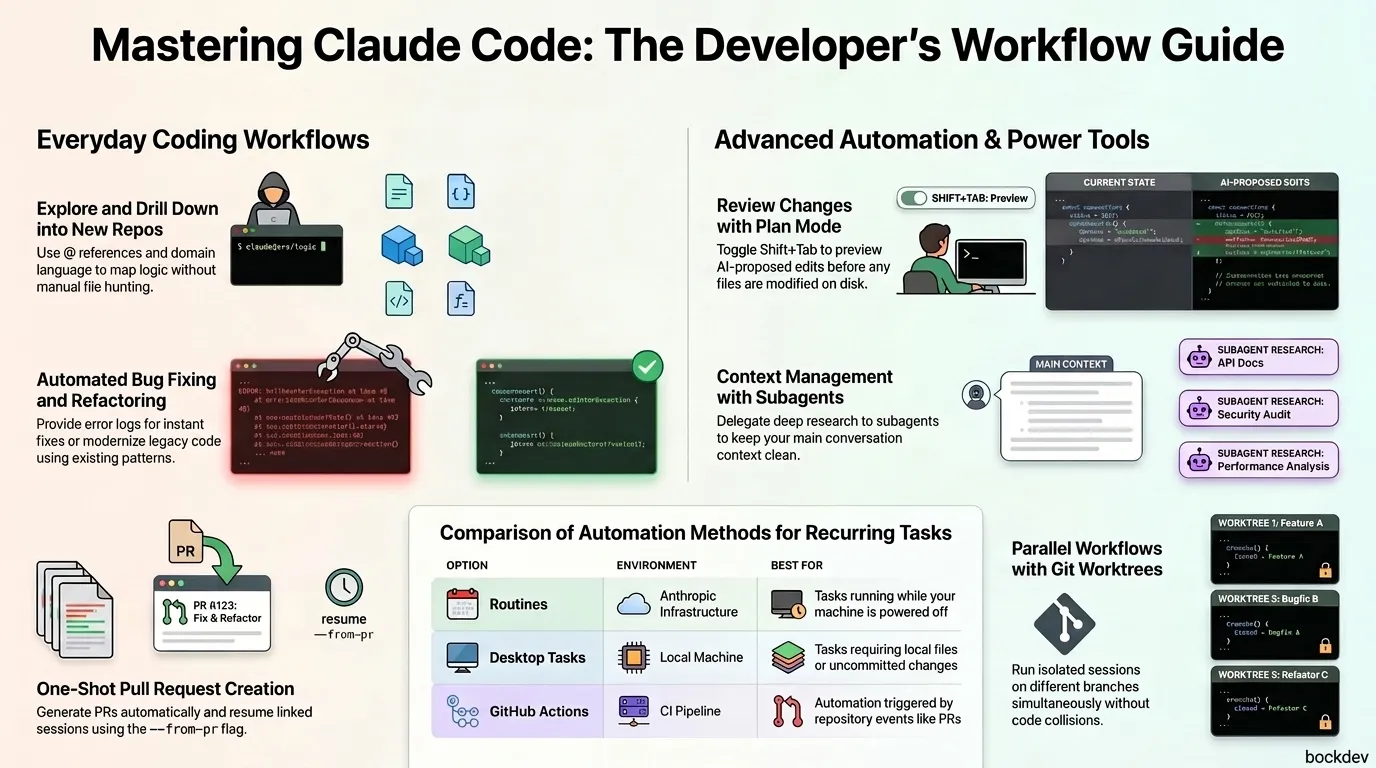
When you're new to a project, start broad and drill down.
bash
cd /path/to/projectclaude
Then ask:
text
give me an overview of this codebase
text
explain the main architecture patterns used here
text
how is authentication handled?
Once you know the lay of the land, find specific code:
text
find the files that handle user authentication
text
trace the login process from front-end to database
Tips:
Use the project's own domain language in your prompts
Reference files directly with @ to skip the back-and-forth: Explain the logic in @src/utils/auth.js
suggest a few ways to fix the @ts-ignore in user.ts
text
update user.ts to add the null check you suggested
The key is giving Claude enough context. Tell it the command that reproduces the issue, the stack trace if you have one, and whether the error is consistent or intermittent. The more specific you are, the better the fix.
Claude reads your existing test files and matches your project's style automatically.
text
find functions in NotificationsService.swift that are not covered by tests
text
add tests for the notification service
text
add test cases for edge conditions in the notification service
text
run the new tests and fix any failures
Claude is especially good at spotting the edge cases you might miss: error conditions, boundary values, and unexpected inputs. Ask it to check for those specifically.
Use @ to include files or directories instantly, without Claude having to read around looking for them.
text
Explain the logic in @src/utils/auth.js
text
What's the structure of @src/components?
text
Show me the data from @github:repos/owner/repo/issues
File paths can be relative or absolute. You can reference multiple files in one message: "Compare @file1.js and @file2.js". Directory references give you a file listing, not file contents.
Feeding Screenshots and Visual Mockups to Claude
Claude Code handles visual context too. Drop in a screenshot, diagram, or mockup and reference it in your prompt.
Ways to add an image:
Drag and drop into the Claude Code window
Copy an image and paste with Ctrl+V (not Cmd+V)
Provide the path: Analyze this image: /path/to/your/image.png
Then ask:
text
Here's a screenshot of the error. What's causing it?
text
Generate CSS to match this design mockup
text
What HTML structure would recreate this component?
Resuming and Continuing Past Claude CLI Sessions
When a task spans multiple sessions, don't start over. Claude saves every conversation locally.
bash
claude --continue
This picks up your most recent session in the current directory. To choose from a list:
bash
claude --resume
Or use /resume from inside a running session.
Running Parallel CLI Sessions with Git Worktrees
Work on two things at once without your changes colliding. Each worktree is a separate checkout on its own branch.
bash
claude --worktree feature-auth
Run the same command with a different name in a second terminal to start an isolated parallel session:
If you want to review changes before they touch your files, switch to plan mode. Claude reads everything and proposes a plan, but makes no edits until you approve.
bash
claude --permission-mode plan
You can also press Shift+Tab mid-session to toggle into plan mode.
Scaling Research and Code Analysis with Subagents
When exploring a large codebase, all those file reads fill your context fast. Hand the investigation off to a subagent instead.
text
use a subagent to investigate how our auth system handles token refresh
The subagent does its work in its own context window and hands you back just the findings.
Scheduling Claude Code Tasks on a Recurring Schedule
Claude Code can run on a schedule so it handles routine tasks without you lifting a finger. Here's how the options compare:
Option
Where it runs
Best for
Routines
Anthropic-managed infrastructure
Tasks that run even when your machine is off
Desktop scheduled tasks
Your machine via the desktop app
Tasks needing access to local files or uncommitted changes
GitHub Actions
Your CI pipeline
Tasks tied to repo events like opened PRs
/loop
Current CLI session
Quick polling while a session is active
When writing prompts for scheduled tasks, be explicit about what success looks like. The task runs on its own and can't ask for clarification. For example: "Review open PRs labeled needs-review, leave inline comments on issues, and post a summary in the #eng-reviews Slack channel."
Non-Interactive Automation: Piping Data Into Claude CLI
Claude works like any Unix tool. Use it non-interactively for CI, pre-commit hooks, or batch processing.
bash
git log --oneline -20 | claude -p "summarize these recent commits"
Stdin and stdout work as expected. This is useful for anything you want to automate without opening an interactive session.
1. Can I use Claude Code in a non-code project like a notes vault or documentation folder?
Yes. Claude Code works in any directory. Point it at a folder of markdown files and it can search, edit, and reorganize content the same way it handles code.
2. What's the difference between claude --continue and claude --resume?
--continue picks up the most recent session in your current directory automatically. --resume opens a list so you can choose which past session to return to.
3. How does Claude handle test generation for different languages or frameworks?
Claude reads your existing test files first and matches the style, framework, and assertion patterns already in use. You don't need to specify them.
4. What does plan mode actually prevent?
In plan mode, Claude reads your files and proposes what it would change, but makes no edits until you give the go-ahead. It's useful when you want to review the scope of changes before anything is written to disk.
5. Can I use Claude Code for scheduled tasks even when my computer is off?
Yes, if you use Routines. Those run on Anthropic-managed infrastructure and can trigger on a schedule, API calls, or GitHub events. Desktop scheduled tasks require your machine to be running.
6. What happens to the context when I use a subagent?
The subagent runs in its own context window. It reads files and does the investigation there, then hands back a summary to your main session. Your main context stays clean.
7. Is the @ file reference different from just asking Claude to read a file?
Using @ is faster. It immediately includes the file's full content in the conversation without Claude needing to use a tool call to read it. It also adds relevant CLAUDE.md files from parent directories.
8. How do worktrees prevent conflicts when running parallel sessions?
Each worktree is a separate checkout on its own branch. Changes in one worktree don't affect the other because they're working from different copies of the repo.
9. Can I pipe output from other tools into Claude, not just git?
Yes. Any tool that writes to stdout can be piped into Claude. Examples: linting output, test results, log files, or any command-line output you want Claude to analyze or summarize.
10. How does Claude know what PR format or documentation style my project uses? Claude reads your existing files. For PRs, it looks at previous PR descriptions if available. For docs, it reads existing comments and docstrings to match the format before generating new ones.