How to Use AI as a Worldbuilding Partner for Your Fantasy Novel
Turn AI into a reliable worldbuilding partner for your fantasy novel with a world bible system, prompt templates, and tools that keep your lore consistent.
AIWorldbuildingFantasy Novel

Senior developers ship more AI generated code than juniors. Here's the data, the reasons behind it, and what junior devs should do differently.
You'd think junior developers would be the ones glued to ChatGPT and Copilot. They're newer, more open to shortcuts, less set in their ways. But the data says the opposite. These autocomplete-based tools represent only one type of developer support; the ecosystem is rapidly shifting from basic code completion to full repository intelligence where the AI understands the entire codebase structure.
Senior developers, the ones with a decade or more of experience, are shipping more AI generated code than anyone else on the team. And they're not just using it more. They trust it more, in higher stakes situations, with less hand wringing.
That sounds backwards until you understand why it's happening. Once you see the mechanism, it changes how you think about who should be using AI tools, and how.
Fastly surveyed 791 professional developers in July 2025, split between seniors (10+ years) and juniors (0-2 years). The gap was not small.
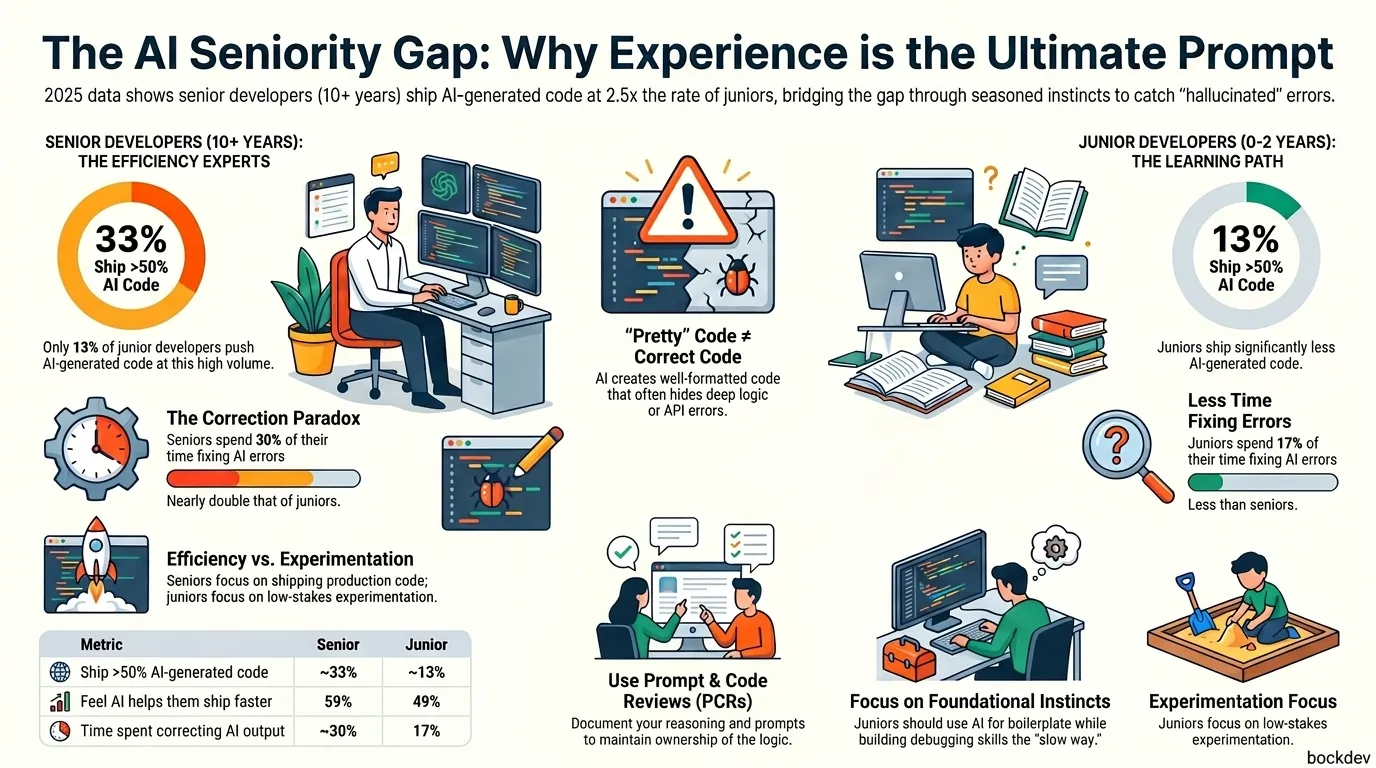
About 32% of senior developers said more than half of their shipped code was AI generated, compared to just 13% of junior developers. That's roughly two and a half times the rate.
Senior developers also felt AI made them work faster more often than juniors did, and they were more likely to actually push that AI code into production rather than just experimenting with it.
Here's a side by side of the key numbers:
| Metric | Senior Devs (10+ yrs) | Junior Devs (0-2 yrs) |
|---|---|---|
| Ship >50% AI generated code | ~33% | ~13% |
| Say AI helps them ship faster | 59% | 49% |
| Report "significant" speed gains | 26% | 13% |
| Spend time fixing AI output until it offsets savings | ~30% | 17% |
That last row matters. Seniors spend more time correcting AI's mistakes, not less. They use AI more aggressively and catch more of its errors at the same time. Those two things aren't a contradiction. They're connected.
A separate Stack Overflow survey (2025) of 49,000+ developers found a less dramatic split: 47% of experienced developers used AI daily, compared to almost 56% of early career developers using it with similar frequency. So the gap isn't universal across every study. But the quality and depth of usage, how much AI code makes it into real production systems, consistently skews senior.
This is the part that surprises people. Seniors aren't using AI more because they're careless. It's the opposite.
According to Fastly, the key factor behind senior developers' confidence is that they're simply better equipped to catch and correct AI's mistakes. They have the experience to recognize when code "looks right" but isn't.
In other words: a senior can spot a subtle bug in AI generated code the same way they'd spot one in a junior teammate's pull request. That skill doesn't come from a course. It comes from years of debugging production fires.
There's also a role shift at play. A senior director at Fastly pointed out that senior engineers don't write code all day to begin with, they're juggling architecture, mentoring, and planning. AI lets them prototype fast and hand off the boring parts, freeing time for the higher level thinking that's actually their job—a practice central to intent-driven development where the engineer acts as an architect and orchestrator rather than a line-by-line typist.
One senior developer in the Fastly study put it simply: AI can bench test code and find errors faster than a human, then fix them seamlessly, something they said they'd seen happen many times.
Compare that to a junior developer's experience in the same study, who said it's frustrating when AI assumes the wrong thing about what they're trying to do, forcing them to redo the work themselves by hand.
Same tool. Completely different experience. The difference is what each person brings to the table before they open the prompt window.
It's not that junior developers are bad at using AI. It's that AI exposes a gap they haven't filled yet: the ability to tell good code from code that merely looks good. Without these verification skills, relying blindly on AI output transitions developers from engineering to what is now known as vibe coding, where code is accepted without understanding the underlying logic.
When AI misreads what a developer wants or builds something that doesn't fit, more experienced engineers know exactly what to look for and fix it. Juniors, especially those still building their instincts, get stuck on these interruptions much more often.
Research framed this as a deeper issue than just bugs. Junior engineers working with AI on unfamiliar tasks under time pressure can lose a sense of ownership over their own work, describing themselves as feeling like frauds and losing their critical thinking skills.
That's a real risk worth naming directly: if you accept AI output without understanding it, you stop building the debugging instincts you'll need later. The tool can replace the output of thinking before you've finished building the capacity to think.
The encouraging part: a Fastly researcher called it heartening that younger developers lean on AI tools less, since it suggests they're still building real skills the slow way. Caution isn't a weakness here. It's a developmental stage.
You don't need ten years of experience to start reviewing AI code more carefully. You need a process. Here's a checklist adapted from how working engineering teams actually do it.
1. Never trust surface quality. AI generated code is almost always well formatted, well commented, and uses descriptive names, none of which guarantees the logic underneath is correct. Pretty code is not the same as correct code.
2. Check every API call against the real library version. AI tools sometimes invent methods or use outdated syntax. Before merging, confirm every external call actually exists in the package version you're using:
# Quick sanity check for Python
pip show requests
python -c "import requests; help(requests.get)"# Quick sanity check for Node
npm list axios
node -e "console.log(require('axios').VERSION)"3. Run an adversarial review pass. Instead of asking "does this work," ask "how could this fail." Try a prompt like:
You are a senior security engineer reviewing this code.
Do not improve it. Find what's wrong with it.
Check for:
- API calls that may not exist in [library@version]
- Unhandled edge cases
- Security issues (auth, input validation, secrets exposure)
- Assumptions about system state that may not hold in production
This kind of adversarial prompt is a real technique used to surface issues, though it's a starting point, not a final verdict; it can produce false positives and still miss things that need deeper system knowledge.
4. Separate mechanical checks from judgment checks. Let automated AI review tools handle the mechanical stuff like hallucinated APIs, test coverage, and pattern consistency. Spend your own time on the things that need human judgment: over-abstraction, real edge cases, and whether the logic actually matches the business need.
5. Tie every AI-assisted PR to a real requirement. AI tools can check code against patterns, but they can't read your ticket and confirm the implementation actually matches what was asked for. Make "does this match the ticket" a manual, non-negotiable step.
A simple folder structure for tracking this on a team, if you want something concrete:
project-root/
├── .ai-review/
│   ├── checklist.md          # the checklist your team agreed on
│   ├── known-pitfalls.md     # patterns AI keeps getting wrong in your codebase
│   └── prompts/
│       └── adversarial-review.txt
├── src/
└── tests/If you're early career, the goal isn't to avoid AI. It's to avoid letting AI substitute for the thinking you still need to build. A great way to begin is by learning how to start building your AI skills today through structured learning and deliberate practice, rather than simple copy-pasting.
A practice called Prompt & Code Reviews (PCRs) is one structured way to do this. The idea is to document the problem you were solving, the key prompts you used, and a short written reason for the approach you chose, so you stay the author of the reasoning even when AI writes the code.
Some practical habits that mirror what seniors already do instinctively:
| If you're a junior dev | If you're a senior dev |
|---|---|
| Use AI for boilerplate, not core logic, until you trust your own judgment | Use AI to prototype fast, then focus your time on review |
| Read and understand every line before merging | Spend your saved time on architecture and mentoring |
| Keep building debugging skills the slow way | Pass your debugging instincts on through code review, not just code |
| Document your prompts and reasoning (PCR style) | Set the team's AI review checklist based on what's actually broken before |
1. Does this mean junior developers shouldn't use AI tools at all?
No. It means juniors should use AI for lower stakes work like boilerplate and syntax help, while still doing the work of understanding what the code does, rather than accepting it blindly.
2. Why do senior developers spend more time fixing AI code if they trust it more?
Because they use it more aggressively and on higher stakes code, so there's simply more AI output for them to review and correct in the first place. More usage means more correction, not less trust.
3. Is AI generated code actually less secure?
Some research suggests this risk is real. A widely cited Stanford study found developers using AI coding assistants were more likely to introduce security vulnerabilities, which is part of why structured review matters regardless of seniority.
4. What's the single biggest mistake junior developers make with AI tools?
Accepting code because it looks clean. AI tends to produce well formatted, well commented code with good looking tests even when the underlying logic is wrong, which breaks the usual visual cues developers rely on to judge quality.
5. Should teams use AI code review tools or human reviewers?
Both, with AI handling the mechanical pattern checks and humans handling architecture and business logic. A two-tier setup like this is increasingly standard.
6. What is a Prompt and Code Review (PCR)?
It's a practice where developers document the problem they were solving, the prompts they used, and their reasoning for the chosen approach, so they remain accountable for the logic even when AI wrote the code.
7. Does using AI tools make developers worse at coding over time?
It can, specifically for people who skip the understanding step. Junior engineers working under time pressure on unfamiliar tasks have reported losing their sense of ownership and feeling like their critical thinking has weakened. The risk is in the habit of not checking, not in the tool itself.
8. How do I check if an AI tool hallucinated a library function?
Run a quick check in your actual environment before merging, for example pip show <package> in Python or npm list <package> in Node, then confirm the method exists in that version's docs.
9. Are senior developers using AI for entire features or just small snippets?
About a third of senior developers say more than half of their shipped code is AI generated, which points to substantial features and modules, not just autocomplete-level snippets.
10. What should a team's AI code review checklist actually include?
At minimum: a check for hallucinated dependencies, a security pass on any auth or data handling code, confirmation the PR matches its linked ticket, and a manual review of edge cases the AI likely didn't consider.
Tags
Turn AI into a reliable worldbuilding partner for your fantasy novel with a world bible system, prompt templates, and tools that keep your lore consistent.
How writers use AI as a brainstorming partner for characters, worldbuilding, and writer's block, without letting it write the story for you.

AI hallucinations happen when models generate confident but false answers. Here's why it occurs and how to spot and reduce it.

A 7-minute routine to find and limit how AI tools and platforms collect, store, and train on your personal data.
Generative AI models like GenCast now create weather ensembles in minutes instead of hours, changing how forecasts are built and used.