Appearance

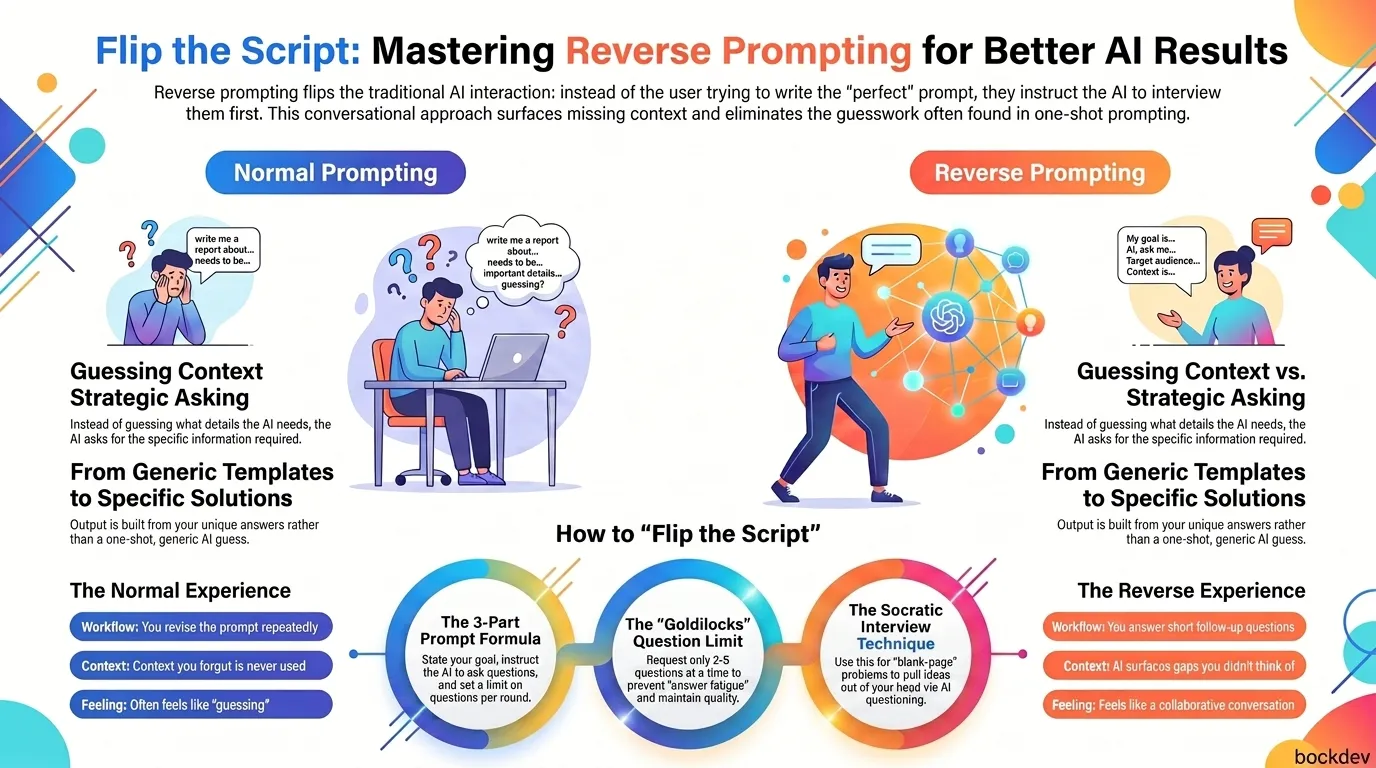
What Is Reverse Prompting?
Reverse prompting means asking the AI to ask you questions before it gives you an answer.
Instead of:
"Write a project plan for my new feature."
You say:
"I want to write a project plan for a new feature. Ask me 5 short questions first, one at a time, to understand what I need."
The AI now drives the conversation. It asks. You answer. By the time it has enough context, it writes something that actually fits your situation, not a generic template.
This isn't a brand-new invention. It overlaps with what researchers call "clarifying questions" in conversational AI, where a system asks a follow-up instead of guessing at an ambiguous request. The difference is you're doing it on purpose, every time, as a habit. It's one of many techniques for writing better prompts that shift control from guesswork to structure.
Why Reverse Prompting Works Better Than Normal Prompting
Most people assume good AI output depends on writing a clever prompt. It actually depends on context. And most of us are bad at dumping all the relevant context into a single message. This is the same problem shadow context and context drift expose over longer conversations — the AI works with whatever it can see, and what it can't see never gets used.
Here's the core problem reverse prompting solves:
| Normal Prompting | Reverse Prompting |
|---|---|
| You guess what details matter | AI asks for the details it actually needs |
| One-shot output, often generic | Output built from your specific answers |
| You revise the prompt repeatedly | You answer short follow-up questions |
| Context you forgot never gets used | AI surfaces gaps you didn't think of |
| Feels like guessing | Feels like a conversation |
One developer described turning a vague idea for team documentation into a finished draft in under 30 minutes, just by answering a set of short questions and then asking the AI to probe specific gaps in a second round.
How to Set Up a Reverse Prompt
You don't need a complicated framework. A reverse prompt has three parts: the goal, the instruction to ask questions, and a constraint on how many questions at a time.
Basic template:
I want to [your goal].
Ask me [number] short questions, one at a time,
to understand what I need.
I'll tell you when to stop.
Real example for writing documentation:
I have a plan for my team's next project.
I've done some early testing.
I want to turn this into clear documentation.
Ask me 5 short questions, one at a time, to help you help me.
Real example for code or system design:
I'm designing a notification system for my app.
Before suggesting an architecture, ask me about
my scale, my tech stack, and my constraints.
Ask 2 questions at a time.
Real example to fix writer's block:
Before we proceed, ask me a question or two
to make sure you understand what I want.
That last one is the simplest version. You can paste it at the end of almost any prompt, and the AI stops guessing and starts asking.
Different Ways to Use Reverse Prompting
Reverse prompting isn't one technique. It's a pattern you can apply differently depending on what you need.
1. The Socratic interview (for blank-page problems)
Use this when you have ideas in your head but can't get started writing. You're not asking the AI to write for you. You're asking it to ask questions that pull the ideas out of you.
I need to write a speech for a friend's wedding.
Don't write anything yet.
Ask me questions to help me remember good stories
and moments we've shared.
2. The adversarial interview (for pressure-testing ideas)
Use this when you already have a plan or argument and want to find the weak spots.
Here is my plan: [paste plan]
Play devil's advocate. Ask me hard questions
that poke holes in my assumptions.
3. The gap-filling interview (for improving an existing draft)
You already wrote something. You suspect it's missing pieces.
Here is a document I've written: [paste document]
Interview me about the gaps you see.
Ask short questions.
After I answer, suggest edits to fill the gaps.
4. The two-stage interview (for complex technical tasks)
A faster, simpler model interviews you first. Then you take that context (or a generated prompt) to a more powerful reasoning model. This is common in data engineering and research workflows, where the first AI gathers requirements and the second one does the heavy lifting. It's a lightweight version of multi-agent orchestration, applied at the prompt level instead of at the system level.
Reverse Prompting vs. Reverse Prompt Engineering
These two terms sound alike but mean different things. Don't mix them up.
| Reverse Prompting | Reverse Prompt Engineering (RPE) | |
|---|---|---|
| Direction | You get the AI to interview you | You analyze an AI's output to guess the prompt that created it |
| Goal | Generate better output from your own context | Understand how a prompt shaped a result |
| When to use | Writing, planning, documentation, coding tasks | Studying AI behavior, improving prompt templates, content audits |
| Example use | "Ask me 5 questions before drafting this report" | "What prompt likely produced this output? What assumptions does it make?" |
Reverse Prompt Engineering works like a diagnostic tool. It can help you guess the structure and intent behind an output, but it can't reveal the exact original prompt or hidden system settings that shaped the result. It's useful, but it solves a different problem than reverse prompting.
When Reverse Prompting Doesn't Help
It's not a silver bullet. Skip it for:
- Tiny, simple tasks. "Fix this typo" doesn't need an interview.
- Tasks where you already have full context written out. If you've already given the AI everything it needs, an interview just adds steps.
- Time-sensitive one-liners. Sometimes you just need a fast, direct answer.
The technique earns its keep on tasks with enough ambiguity or scope to justify a back-and-forth, things like documentation, planning, code architecture, or creative writing where details matter. For a broader view of what makes prompts reliable, The Universal Prompt Playbook covers many complementary approaches.
Project Structure Example: Saving Reverse Prompts as Templates
If you use this regularly, it helps to save your favorite interview prompts so you're not rewriting them each time. A simple folder structure works fine:
ai-prompts/
├── reverse-prompts/
│   ├── documentation-interview.md
│   ├── code-design-interview.md
│   ├── writers-block-interview.md
│   └── gap-analysis-interview.md
├── templates/
│   └── project-plan-template.md
└── README.md
Each .md file just holds the reverse prompt text, plus a note on when to use it. Over time this becomes a personal library you can paste from instead of typing fresh every time.
Tips for Better Results
- Limit questions per round. Ask the AI to send 2 to 5 questions at a time, not twenty at once. Long question lists are exhausting to answer and lower your answer quality.
- Let it know when to stop. Add "I'll tell you when to stop" or "Ask up to 3 rounds." Otherwise some models keep asking indefinitely.
- Correct it mid-interview. If the questions feel off-track, just say so and add more context. The AI will adjust.
- Push back on weak answers. If the AI's summary or draft feels shallow, ask it to dig deeper into a specific point instead of accepting the first pass.
- Combine with role-setting. Telling the AI to act as an editor, architect, or analyst before the interview starts often sharpens the questions it asks. This pairs naturally with Claude prompt engineering best practices, which covers how role framing and structured prompts interact.
Frequently Asked Questions
1. Does reverse prompting work with any AI tool?
Yes. It works with ChatGPT, Claude, Gemini, or any AI that can hold a multi-turn conversation. The technique is just a way of structuring your instructions, not a special feature.
2. How many questions should I ask the AI to ask me?
Start with 3 to 5 questions per round for most tasks. For complex projects, you can do multiple rounds, but keep each round short so it doesn't feel like a chore.
3. Is reverse prompting the same as clarifying questions?
They're related. Clarifying questions are what AI systems sometimes ask on their own when a request is ambiguous. Reverse prompting is you deliberately requesting that behavior every time, instead of waiting for the AI to decide to do it.
4. Can reverse prompting help with coding tasks?
Yes. Before asking for code or an architecture, ask the AI to question you about scale, constraints, tech stack, and edge cases. This usually produces more production-ready suggestions than a single vague request. Intent-driven development takes this idea further, treating AI as an orchestrator that you direct through clear intent rather than instructions.
5. What if the AI asks bad or obvious questions?
Tell it directly. Say something like "skip the obvious ones, ask about X instead." You can redirect mid-interview at any point.
6. Does this technique slow down simple tasks?
Yes, slightly. For quick one-off tasks, a direct prompt is usually faster. Save reverse prompting for tasks with real ambiguity or scope.
7. Can I use reverse prompting for creative writing?
Yes, this is one of its best uses. It helps with writer's block because you're answering direct questions instead of staring at a blank page trying to generate ideas from nothing. It also keeps your voice in the output — a useful counterweight when AI creativity risks overriding your own ideas.
8. What's the difference between reverse prompting and just writing a detailed prompt?
A detailed prompt only works if you already know what details matter. Reverse prompting surfaces the details you didn't think to include, because the AI asks for them directly.
9. How is reverse prompting different from Reverse Prompt Engineering?
Reverse prompting builds new output by having AI question you. Reverse Prompt Engineering works backward from an existing AI output to guess what prompt created it. They share a name but solve different problems.
10. Should I save my reverse prompts for reuse?
Yes. If you find a question sequence that consistently produces good results, save it as a template. This saves time on similar future tasks.
My SaaS
Acluebox
Build modular and reusable system prompts with my SaaS,
Acluebox
. Also, free prompt template generators there.