How to Use AI as a Worldbuilding Partner for Your Fantasy Novel
Turn AI into a reliable worldbuilding partner for your fantasy novel with a world bible system, prompt templates, and tools that keep your lore consistent.
AIWorldbuildingFantasy Novel

Learn how AI products are shifting from chatbox interfaces to invisible, ambient infrastructure that works in the background, with examples, patterns, and code.
You open an app. There's a text box waiting for you to type something. You stare at it for a second, not totally sure what to ask. Sound familiar?
That blank box is everywhere now. Banking apps, email, your project tool, your code editor. It was exciting for about six months. Now it just feels like one more thing demanding your attention before you can get to work.
Here's the shift happening right now: the best AI products are quietly removing that box. Instead of asking you to type a prompt, they just do the work in the background and hand you the result. This is "invisible infrastructure," and it's changing how AI gets built.
Invisible infrastructure is AI that runs without a chat window. You don't talk to it. You don't type into it. It just acts.
Think about electricity. You flip a switch, the light turns on. You don't need to understand the power grid, and you definitely don't "chat" with your wall socket. Good AI infrastructure should feel the same way: silent, reliable, and just there when you need it.
The opposite of this is the "chatbox era" we're still mostly living in, where every AI feature is a box that says "Ask AI" and waits for you to type something.
Chat interfaces took over for a simple reason: they were the cheapest thing to build. A text box plus a model is a fast way to ship an AI feature.
Chat also genuinely works well in one specific situation: when the user doesn't know what they want yet. Brainstorming, studying, drafting something messy and unfamiliar: that's where back-and-forth conversation earns its keep.
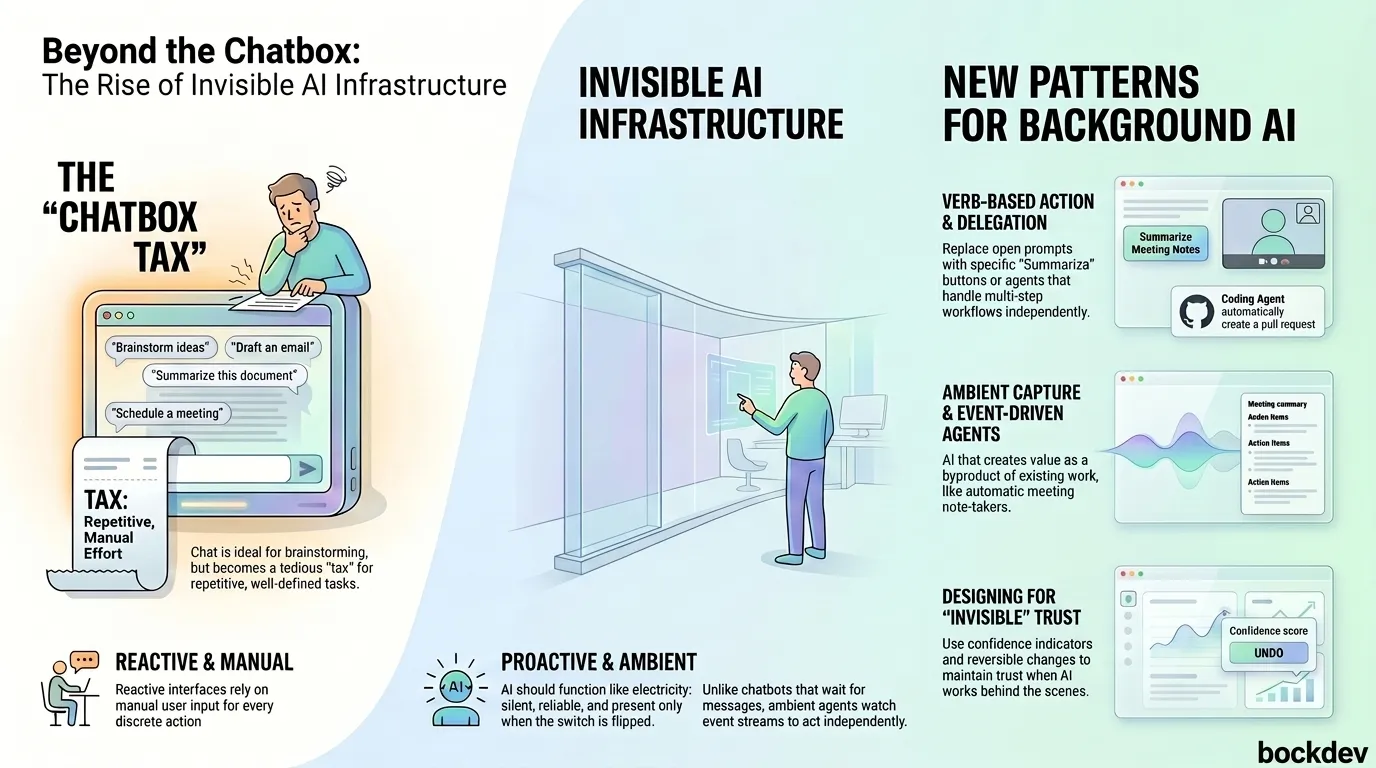
The problem is teams started using chat for everything, including tasks where the user already knows exactly what they want. In that case, the blank box becomes a tax. You have to explain yourself to the machine every single time, even for routine, repetitive tasks.
There's also a structural issue: chat is built around one conversation thread, one person, one pace. Real work isn't like that. You don't hand a colleague one task at a time and wait for them to finish before giving the next one. You delegate several things in parallel. A single chat window can't really do that.
Instead of one chatbox doing everything, AI is splitting into a few clearer patterns. Here's how they compare:
| Pattern | How it works | Best for | Example |
|---|---|---|---|
| Verb-based AI | AI sits behind a button or action, not a prompt | Quick, well-defined tasks | "Summarize," "Translate," "Clean up" buttons |
| Canvas | AI edits a shared document or workspace alongside you | Iterative creative or technical work | AI-assisted code editors, design tools |
| Delegation | You hand off a task; AI works independently and reports back | Multi-step tasks with no need for supervision | Coding agents that open a pull request |
| Ambient capture | AI watches what you're already doing and produces output as a byproduct | Passive tasks like notes or summaries | Meeting note-takers that record automatically |
| Ambient/event-driven agents | AI runs in the background, watching for changes, and acts or alerts when something matters | Monitoring, anomaly detection, proactive nudges | An agent that flags a support ticket before a human even opens it |
The common thread: the user doesn't open a chat window and type a question. The AI is already working.
Ambient agents are a good example of how different this is from a chatbot under the hood. A chatbot waits for a message and replies. An ambient agent watches a stream of events and reacts on its own.
A common (and bad) way teams try to fake this with a chat-style system is polling: repeatedly asking "did anything change yet?" This wastes resources and still misses things that happen between checks.
# Polling approach (inefficient, chat-style thinking)
import time

def check_for_updates():
    while True:
        status = fetch_latest_status()
        if status.has_changed():
            handle_change(status)
        time.sleep(30)  # checks every 30 seconds, misses anything in between
The better approach is event-driven: the agent subscribes to a stream and reacts the moment something happens.
# Event-driven approach (ambient-style thinking)
def on_event(event):
    if event.type == "ticket_escalating":
        notify_team(event.ticket_id)
    elif event.type == "batch_job_anomaly":
        flag_for_review(event.job_id)

event_stream.subscribe(on_event)
That second pattern is what lets AI "notice" a problem before a human opens the app. It requires a different backend than a simple chat endpoint, but it's what makes AI feel proactive instead of reactive.
If you're building a product with this approach, your folder structure often ends up splitting cleanly between the chat-based parts and the ambient parts:
ai-product/
├── chat/                  # traditional chatbox interface
│   ├── conversation.js
│   └── prompt-templates/
├── agents/                # ambient, event-driven agents
│   ├── listeners/         # subscribe to events (tickets, jobs, calendar)
│   ├── actions/           # what the agent does when triggered
│   └── escalation.js      # hands off to a human when needed
├── delegation/             # async tasks handed off and run independently
│   └── tasks/
└── ambient-capture/        # passive recording/summarizing features
    └── meeting-notes.js
Notice that "chat" is just one folder here, not the whole product.
If users can't see the AI working, they need other signals to trust it. A few practical patterns that show up across products right now:
Confidence indicators. Show how sure the AI is, especially for anything with real stakes (medical, financial, code).
<span class="confidence-badge" data-level="high">92% confidence</span>Visible, reversible changes. If the AI rearranges something for you, label it and let people undo it.
<div class="ai-adapted">
  Personalized for you
  <button onclick="resetToDefault()">Reset to default</button>
</div>
Delegation confirmation for risky actions. Anything irreversible (payments, deletions, sending something) should still get a confirm step, even in an ambient system.
function handleAgentAction(action) {
  if (action.isIrreversible) {
    return requestUserConfirmation(action);
  }
  return executeAction(action);
}
The goal isn't to hide the AI completely. It's to only interrupt the user when it actually matters.
Chat isn't dead, and this isn't an argument to delete every chatbox. Use chat when:
Skip chat (or move past it) when:
Before defaulting to a chatbox for a new AI feature, ask:
The chatbox was never the goal. It was a cheap, fast way to ship AI when nobody had figured out anything better yet.
The products winning now treat chat as one tool among several, not the default for everything. The real shift is AI that quietly finishes work in the background, and only shows up when it actually needs you.
1. What does "invisible infrastructure" mean in AI products?
It means AI that works in the background without a visible chat interface, similar to how electricity works without you needing to understand the power grid.
2. Is the chatbox interface going away completely?
No. Chat still works well when users don't know exactly what they want, like brainstorming or drafting something unfamiliar. It's being used more selectively, not eliminated.
3. What's the difference between a chatbot and an ambient agent?
A chatbot waits for a message and responds. An ambient agent watches for events in the background and acts or alerts on its own, without being asked.
4. Why is polling a bad way to build ambient AI features?
Polling repeatedly checks "did anything change" on a timer, which wastes resources and can miss events that happen between checks. Event-driven systems react immediately instead.
5. What is "delegation" in AI UX?
Delegation means handing a multi-step task to AI and letting it work independently, reporting back when done, similar to assigning work to a colleague instead of supervising every step.
6. What is "ambient capture"?
It's AI that produces useful output as a byproduct of something you were already doing, like a meeting note-taker that records and summarizes without you asking it to.
7. How do you keep AI trustworthy if it's invisible?
Use confidence indicators for high-stakes outputs, make automated changes visible and reversible, and require confirmation before irreversible actions like payments or deletions.
8. Should every AI feature skip the chatbox?
No. Use the self-check: if the user knows exactly what they want and the task is repetitive, skip chat. If they're still exploring an idea, chat is still the right tool.
9. What's a practical first step to move away from chatbox-only design?
Pick one repetitive task users currently do through chat and turn it into a single button or automatic action instead. Then measure if it saves time.
10. Does invisible AI need different backend architecture than a chatbot?
Yes. Ambient, event-driven agents need a system that subscribes to changes in real time, which is structurally different from a simple chat request-response endpoint.
Tags
Turn AI into a reliable worldbuilding partner for your fantasy novel with a world bible system, prompt templates, and tools that keep your lore consistent.
How writers use AI as a brainstorming partner for characters, worldbuilding, and writer's block, without letting it write the story for you.

AI hallucinations happen when models generate confident but false answers. Here's why it occurs and how to spot and reduce it.

A 7-minute routine to find and limit how AI tools and platforms collect, store, and train on your personal data.
Generative AI models like GenCast now create weather ensembles in minutes instead of hours, changing how forecasts are built and used.