GPT-5.5 Prompting Guide: How to Write Better Prompts
A practical guide to prompting OpenAI's GPT-5.5. Learn about outcome-first prompts, stopping conditions, preambles, and formatting controls.
ChatGPTGPT-5.5OpenAIPrompt EngineeringAI Best Practices

Understand what Ahead-of-Time (AOT) prompt compilation is, how it utilizes prompt caching to reduce latency, and how to implement it to save API token costs.

You send a prompt to an LLM. It works. But as your app grows, you notice something: every request feels slow, tokens are piling up, and costs are creeping higher. You optimize your code, but the bottleneck is somewhere else entirely -- inside the prompt itself.
Most developers treat prompts as static strings. They write them once, maybe tweak them a bit, and ship. But as prompts get longer and more complex, that "write once, run every time" approach starts to hurt. You're re-processing the same instructions on every single call, paying for tokens you've already paid for, and waiting for the model to re-read context it already knows.
That's exactly the problem Ahead-of-Time (AOT) Prompt Compilation is designed to solve. Instead of sending your full prompt at runtime, you pre-process and "compile" the reusable parts in advance -- so your app runs faster, cheaper, and smarter.
Ahead-of-Time (AOT) prompt compilation is the software architectural practice of pre-processing and caching the static components of an LLM prompt (such as system instructions, context documents, or few-shot examples) before runtime. By compiling these reusable parts in advance, developers reduce the tokens the model must process on each subsequent query, lowering latency and API costs.
In LLM terms, it means processing your system prompt or other static context before your application goes live. The compiled output (often a cached key-value representation of the prompt) is stored and reused across requests, so the model doesn't re-process the same instructions over and over.
Think of it like compiling code. You don't recompile your entire codebase every time a user clicks a button. You compile once, run many times.
Most LLM apps today use Just-in-Time (JIT) prompt processing. The full prompt is assembled and sent at request time, every time.
AOT flips this. The static parts of the prompt are processed in advance and cached. At runtime, only the dynamic parts (user input, session data) are appended.
| Feature | JIT Prompting | AOT Prompt Compilation |
|---|---|---|
| When prompt is processed | At every request | Once, before runtime |
| Latency | Higher (full re-processing) | Lower (cache hit) |
| Token cost per request | Full prompt billed | Only new tokens billed |
| Good for | Short/dynamic prompts | Long, stable system prompts |
| Setup complexity | Low | Moderate |
The core mechanism behind AOT is prompt caching at the infrastructure level. Here is the general flow:
Anthropic supports prompt caching via a special cache_control parameter. Here is a minimal example:
import anthropic

client = anthropic.Anthropic()

response = client.messages.create(
    model="claude-opus-4-5",
    max_tokens=1024,
    system=[
        {
            "type": "text",
            "text": "You are a helpful legal assistant. You have deep expertise in contract law, IP rights, and compliance. Always cite relevant clauses and provide step-by-step reasoning.",
            "cache_control": {"type": "ephemeral"}  # Mark this block for caching
        }
    ],
    messages=[
        {
            "role": "user",
            "content": "What are the key clauses I should look for in an SaaS agreement?"
        }
    ]
)

print(response.content)
The cache_control: ephemeral flag tells the API to cache this block. On subsequent requests using the same system block, you pay only for the new user message tokens.
OpenAI automatically caches prompt prefixes of 1,024 tokens or more. No extra configuration is needed -- just keep your system prompt consistent across requests.
from openai import OpenAI

client = OpenAI()

# This system prompt will be automatically cached after the first call
# as long as it stays the same across requests
response = client.chat.completions.create(
    model="gpt-4o",
    messages=[
        {
            "role": "system",
            "content": "You are an expert data analyst. Always respond with structured JSON..."
            # (assume this is a very long system prompt)
        },
        {
            "role": "user",
            "content": "Analyze the following sales data: ..."
        }
    ]
)
OpenAI shows cached token usage in usage.prompt_tokens_details.cached_tokens in the response object.
AOT is not always the right tool. It works best in specific scenarios.
Use AOT when:
Skip AOT when:
Imagine you are building a customer support bot that always starts with a 2,000-token prompt containing your product documentation.
Without AOT, every user message bills for all 2,000 tokens.
With AOT, you cache the documentation block once. Each follow-up message only bills for the new user query.
# Pseudocode for a RAG + AOT setup

STATIC_CONTEXT = load_product_docs()  # 2000 tokens of stable context

def handle_user_message(user_input: str):
    response = client.messages.create(
        model="claude-opus-4-5",
        max_tokens=512,
        system=[
            {
                "type": "text",
                "text": STATIC_CONTEXT,
                "cache_control": {"type": "ephemeral"}
            }
        ],
        messages=[
            {"role": "user", "content": user_input}
        ]
    )
    return response.content
The first request builds the cache. Every request after that reuses it, saving time and tokens.
Here is a clean way to organize a project that uses AOT prompt compilation:
my-llm-app/
├── prompts/
│   ├── system_prompt.txt        # Static, cacheable system prompt
│   ├── few_shot_examples.txt    # Static examples for caching
│   └── dynamic_templates/
│       └── user_query.jinja2    # Dynamic, runtime-assembled parts
├── cache/
│   └── prompt_cache_manager.py  # Handles cache key logic
├── api/
│   └── llm_client.py            # API calls with cache_control
└── main.py
Keeping static and dynamic content separate makes it easy to know what should be cached and what should not.
Benefits:
Trade-offs:
1. What exactly gets "compiled" in AOT prompt compilation?
The static parts of your prompt (system instructions, background docs, few-shot examples) are pre-processed and stored as a cached key-value representation on the model provider's infrastructure. Dynamic content is added at runtime on top of this cached base.
2. Is AOT prompt compilation the same as prompt caching?
They are closely related. AOT is the architectural concept (process once, reuse many times). Prompt caching is the underlying mechanism that makes AOT possible at the API level.
3. How much can I save on tokens with AOT?
It depends on your prompt length and request volume. For a 2,000-token system prompt with 10,000 daily requests, you could eliminate up to 20 million cached tokens per day from your billing. Exact savings depend on your provider's caching pricing.
4. Does AOT work with all LLM providers?
Not all providers support it equally. Anthropic has explicit cache_control support. OpenAI handles caching automatically for long, repeated prefixes. Google Gemini also has context caching. Always check your provider's documentation.
5. How long does a cached prompt stay active?
It varies by provider. Anthropic's ephemeral cache expires after about 5 minutes of inactivity. OpenAI's cache persists for a session but resets if the prefix changes. Some providers offer longer-lived "persistent" caches.
6. What happens if I update my system prompt?
The cache is invalidated and rebuilt on the next request. This is expected behavior. For this reason, avoid making frequent small changes to your static prompt -- batch your updates and re-cache intentionally.
7. Can I use AOT with multi-turn conversations?
Yes. Cache the system prompt and any stable context. For the conversation history (which is dynamic), append it at runtime as normal. Only the stable prefix benefits from caching.
8. Is there a minimum prompt length for caching to be effective?
Generally, caching is most effective for prompts over 500-1,000 tokens. Short prompts have minimal token savings, and the overhead of cache management may not be worth it.
9. Can AOT prompt compilation improve app response time noticeably?
Yes. Cached prompts reduce the number of tokens the model needs to process, which directly lowers time-to-first-token (TTFT). For long system prompts in production apps, this can shave hundreds of milliseconds off each response.
10. Do I need special infrastructure to implement AOT?
No. If your provider supports prompt caching, it is handled server-side. You just need to structure your API calls correctly (separating static from dynamic content) and use the appropriate flags like cache_control.
OpenAI Prompt Caching - https://platform.openai.com/docs/guides/prompt-caching
Anthropic Prompt Caching - https://docs.anthropic.com/en/docs/build-with-claude/prompt-caching
Context Caching with the Gemini API - https://ai.google.dev/gemini-api/docs/caching
Lewis, P., et al. (2020). Retrieval-Augmented Generation for Knowledge-Intensive NLP Tasks - https://arxiv.org/abs/2005.11401
Tags
A practical guide to prompting OpenAI's GPT-5.5. Learn about outcome-first prompts, stopping conditions, preambles, and formatting controls.
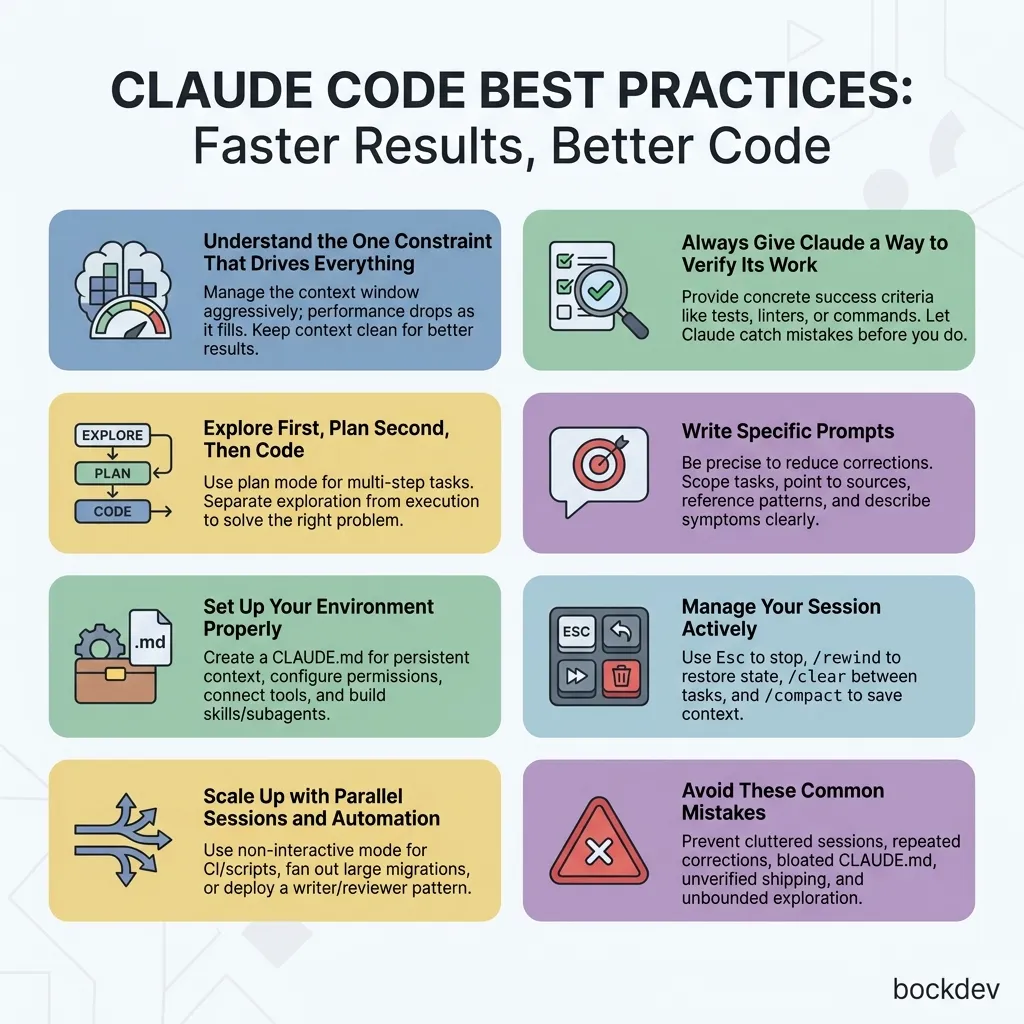
Master Claude Code best practices. Learn context management, CLI command guidelines, CLAUDE.md setup, subagents, and how to avoid common coding errors.
Looking to build your AI skills but don't know where to start? Discover the best pathways, free learning resources, practical applications, and hands-on project ideas to gain AI proficiency today.