Claude Code Memory: How to Use CLAUDE.md & Auto Memory
Learn how Claude Code persists project rules, build commands, and coding preferences across sessions using CLAUDE.md files and the Auto Memory engine.
Ever opened a new Claude Code session and had to re-explain the same project rules all over again? Maybe you told it "always use pnpm, not npm" last week. Today, it forgot. You type it again. Next week, same thing.
That gets old fast. The good news is Claude Code has two built-in systems that carry knowledge from one session to the next. You do not need to repeat yourself every time.
This guide breaks down both systems, when to use each one, and how to set them up properly.
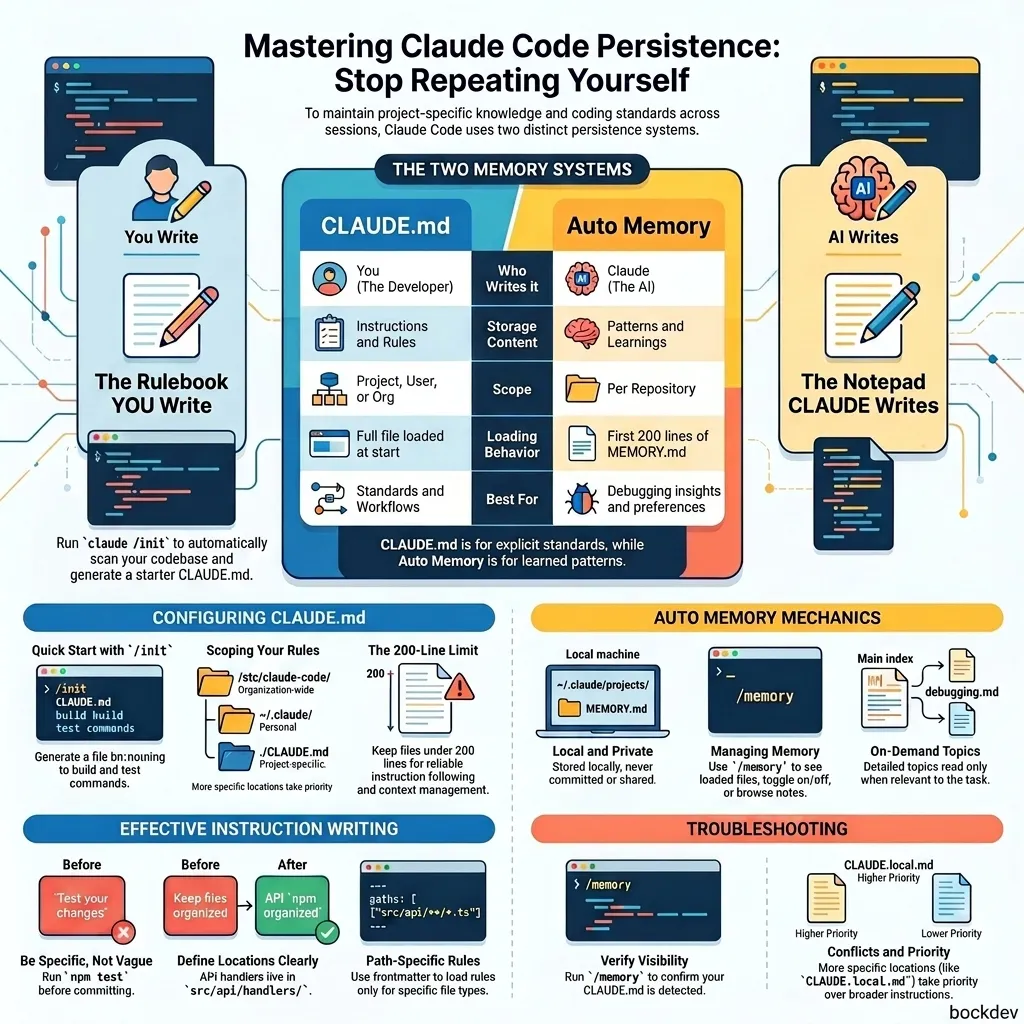
More specific locations take priority over broader ones. Both CLAUDE.md and CLAUDE.local.md load at the same level, with the local file appended after.
Keep files under 200 lines. Longer files eat up context and Claude follows them less reliably.
Be specific:
# GoodUse 2-space indentation.Run `npm test` before committing.API handlers live in `src/api/handlers/`.# BadFormat code properly.Test your changes.Keep files organized.
Use markdown headers and bullets to group related rules. Claude scans structure the same way humans do.
Rules can load only when Claude works with matching files. Add YAML frontmatter at the top of any rules file:
markdown
---paths: - "src/api/**/*.ts"---# API Development Rules- All endpoints must include input validation- Use the standard error response format- Include OpenAPI documentation comments
Auto memory lets Claude take its own notes as it works. It saves things like build commands it had to figure out, debugging patterns, code style preferences it picked up from your corrections.
You do not write anything. Claude decides what is worth saving.
~/.claude/projects/<project>/memory/├── MEMORY.md # Index loaded every session├── debugging.md # Detailed debugging notes├── api-conventions.md # API decisions└── ...
The <project> path comes from the git repository root, so all worktrees share one memory directory. Auto memory is local to your machine and not synced.
Only the first 200 lines (or 25KB) of MEMORY.md loads at session start. Claude keeps this file short and moves detailed notes into topic files. Topic files like debugging.md are read on demand, not at startup.
Run /memory and check that your file is listed. If it is not listed, Claude cannot see it.
Check the file location matches where you launched Claude from.
Make instructions more specific (see examples above).
Look for conflicting instructions across multiple CLAUDE.md files.
For instructions that must run at a specific moment (before every commit, after every file edit), use hooks instead. Hooks execute as shell commands at fixed lifecycle events and always run regardless of what Claude decides.
Project-root CLAUDE.md reloads after /compact. Nested CLAUDE.md files in subdirectories do not reload automatically. They come back the next time Claude reads a file in that subdirectory.
If an instruction vanished, it was either in the conversation only, or in a nested file that has not reloaded yet. Add it to your root CLAUDE.md to make it stick.
1. What is the difference between CLAUDE.md and auto memory?
CLAUDE.md is written by you and contains explicit rules. Auto memory is written by Claude and contains things it learns from working with you.
2. Does CLAUDE.md work like a system prompt?
No. It is delivered as a user message after the system prompt. Claude reads and tries to follow it, but it is not strictly enforced. Specific, concrete instructions work much better than vague ones.
3. How many lines should my CLAUDE.md be?
Stay under 200 lines per file. Longer files consume more context and Claude follows them less reliably.
4. Can I have multiple CLAUDE.md files in the same project?
Yes. Claude loads CLAUDE.md files from parent directories all the way up to the root, plus any files in subdirectories when Claude reads files there. More specific paths take precedence.
5. Will auto memory be shared with my team?
No. Auto memory is stored locally on your machine under ~/.claude/projects/ and is not committed to version control.
6. How do I make Claude remember something specific?
Just tell it during a session: "always use pnpm, not npm" or "remember that API tests need a local Redis instance." Claude saves it to auto memory. To put it in CLAUDE.md instead, say "add this to CLAUDE.md."
7. What happens to auto memory across git worktrees?
All worktrees and subdirectories of the same git repository share one auto memory directory.
8. Can I use path-scoped rules in auto memory?
No. Path-scoped rules only apply to .claude/rules/ files that you create. Auto memory does not support path scoping.
9. How do I stop a specific CLAUDE.md from loading in a monorepo?
Use the claudeMdExcludes setting in .claude/settings.local.json:
10. Can organization admins enforce instructions that users cannot override?
Yes. Place a CLAUDE.md at the managed policy location (for example /etc/claude-code/CLAUDE.md on Linux) and deploy it via MDM or Ansible. This file cannot be excluded by individual settings.