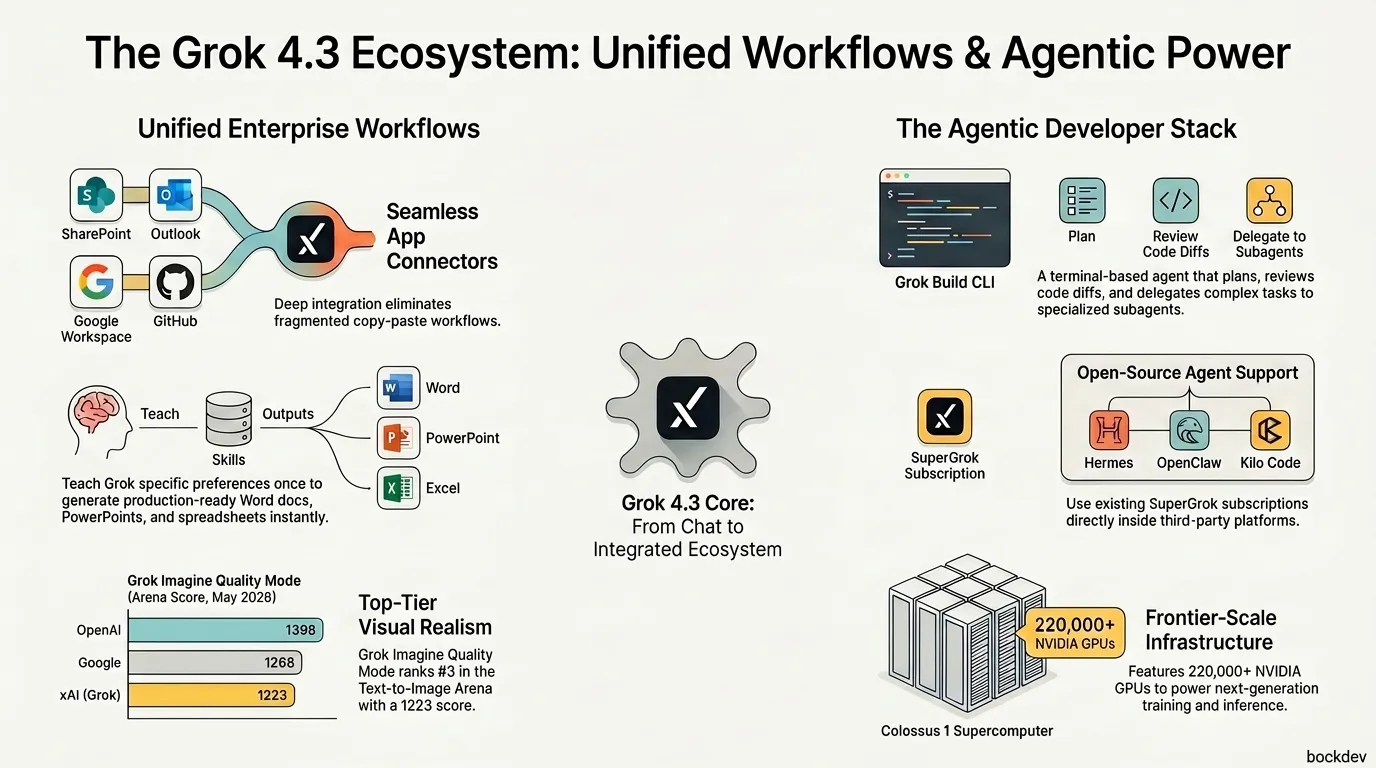
Grok May 2026 Recap: Connectors, Build CLI & Developer Tools
A comprehensive recap of xAI's May 2026 updates: Grok Build CLI, new Connectors, Hermes Agent integrations, and the Grok Imagine Quality Mode API.
GrokxAIAI AgentsDeveloper Tools
Learn about the Model Context Protocol (MCP), an open standard for connecting AI assistants to data sources and tools. Explore its host-client-server architecture, real-world use cases, and how to build a custom MCP server.
The Model Context Protocol (MCP) is an open-source standard that enables developers to build secure, bi-directional connections between data sources and AI models. Introduced by Anthropic, it acts like a "USB-C port for AI applications"—providing a universal standard to connect LLM-powered hosts to local files, databases, APIs, and business applications.
Whether you are building a single-agent task handler or a multi-agent orchestrated system, MCP provides a standardized way to integrate models with the real world. By standardizing client-server communication, it allows AI hosts and clients to interact with diverse data servers without needing custom integrations for each, making it much easier to build reliable, goal-driven agents.
MCP follows a host–client–server structure. Here's how each role functions in the system:
| Role | MCP Context | Examples |
|---|---|---|
| Host | The AI application or IDE that orchestrates tools and manages user interaction. | Claude Desktop, Cursor, local agent CLI |
| Client | The component within the host that establishes and maintains a 1:1 connection to the server. | MCP Client library inside the host |
| Server | A lightweight service that exposes data sources (Resources), actions (Tools), and template prompts. | GitHub server, Postgres server, custom API server |
Clients and servers communicate over standard transports like JSON-RPC 2.0 over standard input/output (stdio) for local processes, or Server-Sent Events (SSE) for remote servers.
And now let’s explore how MCP powers real-world applications across different tools and platforms.
MCP + GitHub -> To explore, understand, and safely modify GitHub codebases using structured tools, context awareness, and permission controls (similar to how Claude Code interacts with local repositories). Key capabilities:
🛠️ Refactoring Code - Identify patterns (e.g. repeated logic or old API usage) and apply improvements through safe, traceable edits.
🐞 Bug Detection and Fixing - Read code, identify potential issues, suggest fixes, and apply them using tool calls like readFile and updateFile.
📋 Automated Documentation - Generate or update README files, docstrings, or inline comments by analyzing code structure and logic.
✅ Code Review Assistance - Provide intelligent feedback on open pull requests by reading diffs and commenting on potential issues or improvements.
MCP + Notion -> To interact with Notion workspaces for reading, editing, summarizing, and organizing content based on user instructions and access control. For instance:
✍️ Summarize Notes or Docs - Extract key points from meeting notes or long documents.
🧩 Reorganize Pages - Use reorderBlocks to move or restructure content blocks for clarity.
✅ Update Status Fields - Automatically change task statuses or properties based on updates.
🧹 Content Cleanup - Remove duplicates, fix formatting, or rewrite content for clarity.
MCP + Google Drive -> Browse, search, and manage files in Google Drive while respecting permissions and folder scopes. Example tasks:
🔍 Find Specific Documents - Use queries like “find last month’s reports” and retrieve matching files.
🗂️ Organize Files - Move, rename, or categorize files into proper folders.
📄 Generate Summaries - Summarize long PDFs, Docs, or Sheets stored in Drive.
📡 Monitor Shared Drives - Report on new uploads or access issues across shared folders.
MCP + Slack -> Act as a support agent in Slack to read customer messages, access tools and reply with approved workflows. Practical uses:
🤖 Auto-Respond to FAQs - Recognize common questions and reply using verified answers.
🧭 Triage Issues - Classify and escalate technical issues to the right human team.
📋 Summarize Conversations - Compile chat history into concise summaries for handoffs.
🎫 Log Tickets - Automatically create support tickets in tools like Jira or Zendesk.
MCP + Jira -> To navigate Jira boards, read or update issues, and help manage sprints within the control boundaries set by MCP. MCP in action:
📝 Summarize Ticket Threads - Condense comment chains into clear summaries.
🔄 Update Issue Fields - Change assignees, statuses, or priorities when needed.
🆕 Create Tickets - Use createIssue Generate new issues from Slack or chat commands.
🧠 Suggest Sprint Planning Edits - Recommend backlog grooming or sprint reshuffling.
MCP + Calendar Apps -> Lets the model access scheduling tools to check availability, book meetings, and manage event data securely. Schedule meetings based on preferences and context. For example:
🕵️ Find Open Slots - Search for available time based on user preferences or team schedules.
📆 Schedule Meetings - Create events with attendees, agendas, and video links via structured scheduling functions.
🔁 Reschedule or Cancel - Modify or cancel events in response to changes in availability or priorities.
📝 Send Summaries - Provide quick meeting summaries or pre-event reminders to participants.
MCP + Database (e.g. Neon DB) -> Run safe, scoped queries on a Postgres to extract insights, generate reports, and visualize data. Use cases:
🔎 Query Sales or Usage Data - Use runQuery to answer questions like “What were the top 5 products last month?”
🧾 Generate Reports - Create weekly summaries of KPIs or user growth.
📈 Visualize Trends - Output charts or summaries from raw SQL results.
🧠 Schema-Aware Suggestions - Recommend queries based on table structures and past queries.
To use an MCP server in an assistant like Claude Desktop, you specify it in your local client configuration file (claude_desktop_config.json). Below is an example configuration that mounts local PostgreSQL and GitHub MCP servers:
{
  "mcpServers": {
    "postgres": {
      "command": "npx",
      "args": [
        "-y",
        "@modelcontextprotocol/server-postgres",
        "postgresql://username:password@localhost:5432/mydb"
      ]
    },
    "github": {
      "command": "npx",
      "args": [
        "-y",
        "@modelcontextprotocol/server-github"
      ],
      "env": {
        "GITHUB_PERSONAL_ACCESS_TOKEN": "your_token_here"
      }
    }
  }
}Creating a custom MCP server is straightforward using the official SDKs. Here is a simple Python example using the FastMCP framework to expose a custom weather lookup tool:
from mcp.server.fastmcp import FastMCP

# Initialize the FastMCP server
app = FastMCP("WeatherService")

@app.tool()
async def get_weather(city: str) -> str:
    """Get the current weather forecast for a city."""
    # In a production app, you would fetch from a weather API
    return f"The weather in {city} is sunny and 72°F."

if __name__ == "__main__":
app.run()While MCP brings modularity to tool integration, developers must address several concerns:
Model Context Protocol (MCP) brings structure, standardization, and interoperability to AI-powered systems. By decoupling client implementations from tool logic, it transforms language models into reliable, context-rich assistants. Whether you are automating software tasks, querying databases, or managing spreadsheets, MCP provides a unified standard that is rapidly becoming the default protocol for agentic workflows.
1. What is the Model Context Protocol (MCP)?
MCP is an open standard that enables developers to build secure, bi-directional connections between AI assistants and external data sources or tools.
2. Who developed MCP?
MCP was introduced as an open-source standard by Anthropic in November 2024.
3. What is the primary metaphor used for MCP?
It is often described as a "USB-C port for AI applications," standardizing connections between AI models and local or remote systems.
4. What are the three core roles in the MCP architecture?
The Host (the AI app like Claude Desktop), the Client (the component within the host establishing connection), and the Server (the lightweight program exposing data or tools).
5. What is the difference between a Tool and a Resource in MCP?
A Resource is read-only data (like a database schema or file content), whereas a Tool is an executable action the model can trigger (like writing a file or running a query).
6. How do hosts and servers communicate in MCP?
They communicate using JSON-RPC 2.0 messages sent over standard input/output (stdio) or HTTP/Server-Sent Events (SSE).
7. Which programming languages have official MCP SDKs?
Official SDKs are available for TypeScript/Node.js and Python, with community ports for Go, Rust, Java, and other environments.
8. How do I configure a local MCP server in Claude Desktop?
You configure it by editing your claude_desktop_config.json file and defining the command, arguments, and environment variables for the server.
9. Is MCP secure to use?
Yes, because the client maintains control. You explicitly configure which servers run locally or remotely, what directories they can access, and approve any destructive actions.
10. Can multiple AI hosts connect to the exact same MCP server?
Yes. Because it is an open standard, any AI agent or IDE that implements the MCP client protocol can connect to any compatible MCP server.
Tags
A comprehensive recap of xAI's May 2026 updates: Grok Build CLI, new Connectors, Hermes Agent integrations, and the Grok Imagine Quality Mode API.
This guide skips the hype and shows you ways to hand off email, scheduling, data entry, and other daily admin work to autonomous AI agents without losing control.

Multi-agent orchestration is transforming how AI systems are built, replacing single overloaded agents with teams of specialized AI agents that collaborate to tackle complex tasks. This guide explains what it is, how it works, which frameworks to use, and when to apply it.

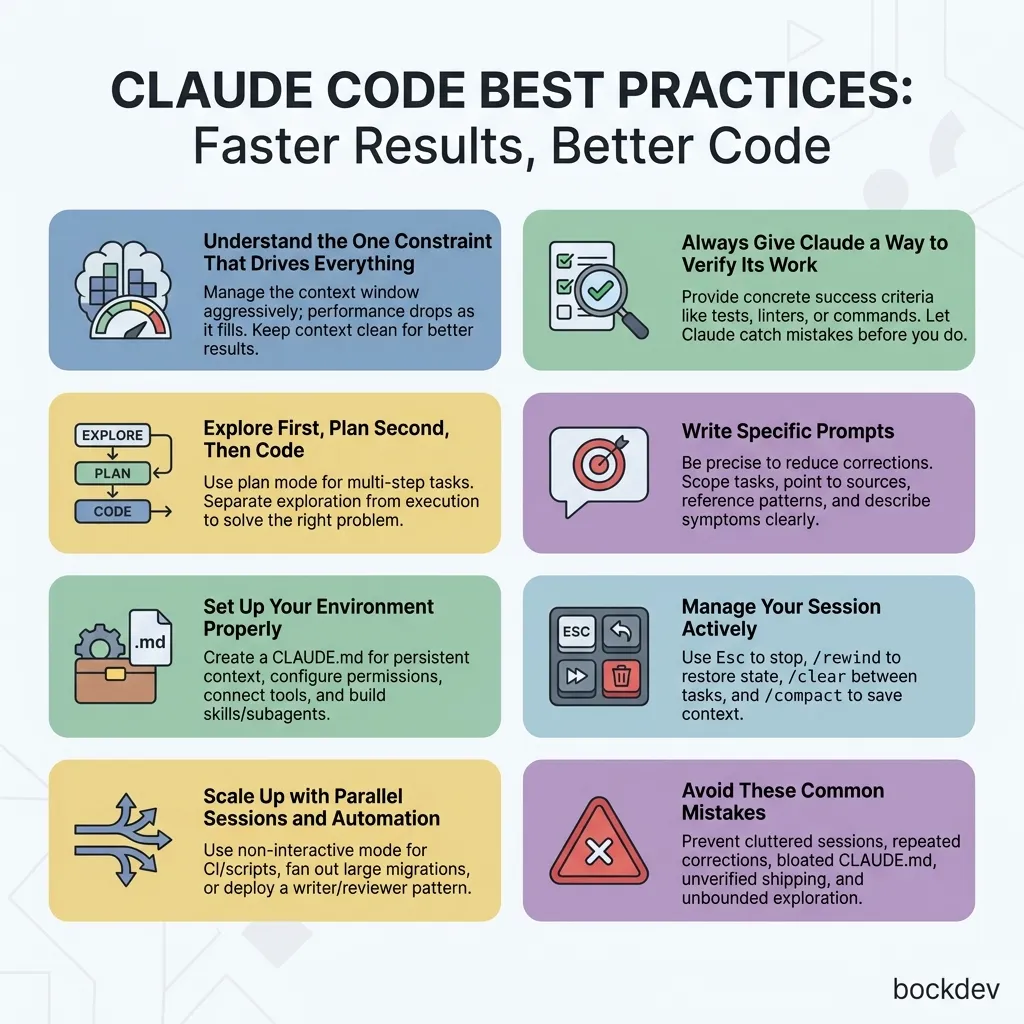
Master Claude Code best practices. Learn context management, CLI command guidelines, CLAUDE.md setup, subagents, and how to avoid common coding errors.
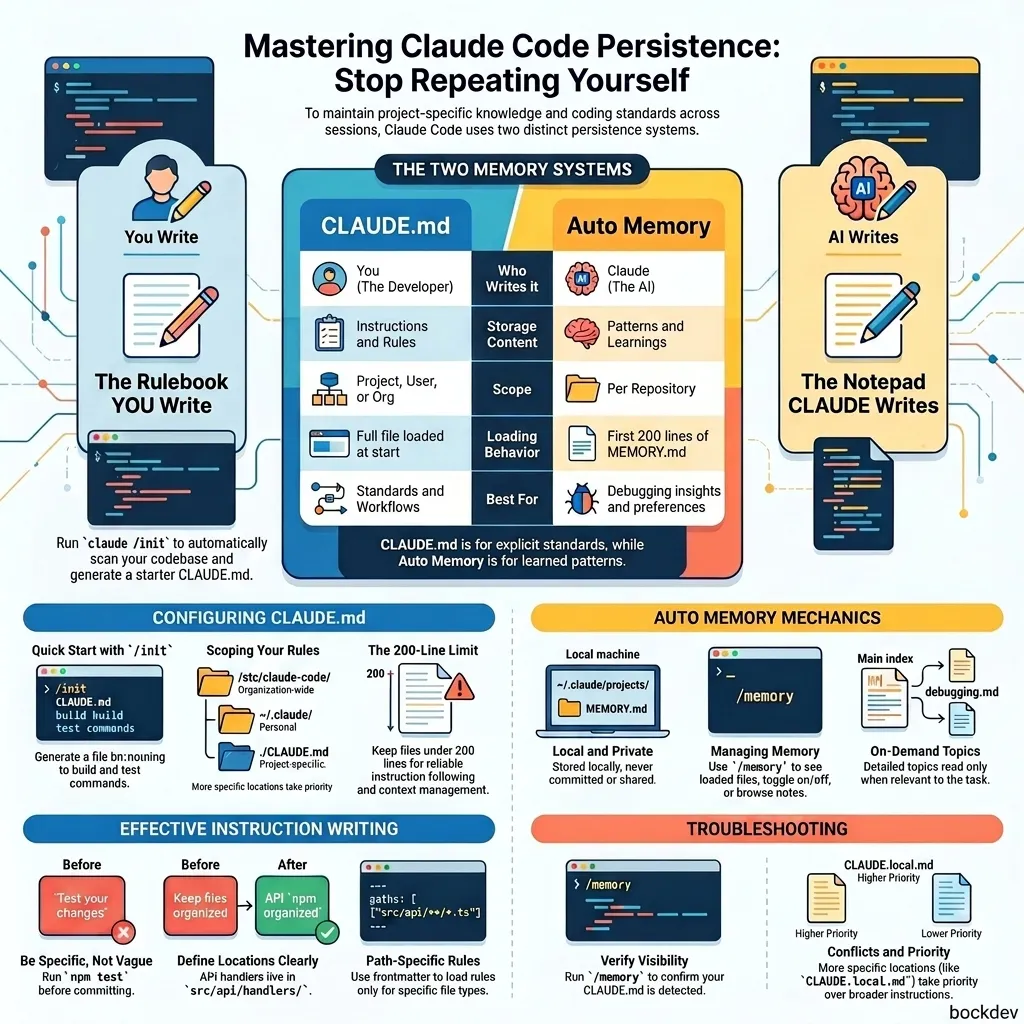
Learn how Claude Code persists project rules, build commands, and coding preferences across sessions using CLAUDE.md files and the Auto Memory engine.